
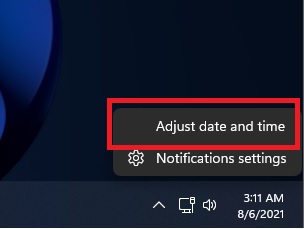
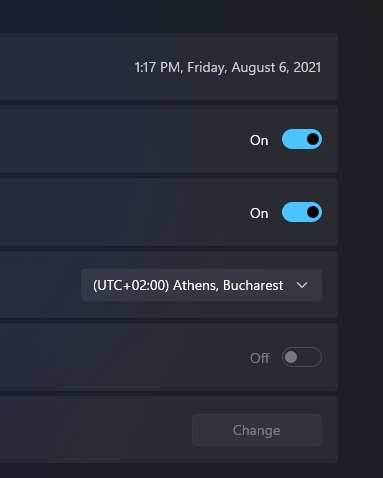
Windows 11, setare data si ora Data 06/08/2021 Autor Catalin Hodoleanu Categorie Soluții 2 658 Configurare noua (How To) SituatieIn cele mai frecvente cazuri, dupa ce instalam windows 11, data si ora pot fi setate incorect. Solutie Pasi de urmat Click dreapta pe ceasul din bara, si ajust date and time: La timezone alegem “UTC +02:00 Athene, Bucharest”: Daca totul e setat corect ne va afisa data si ora actuala: Tip solutiePermanent Voteaza Up Down (20 din 38 persoane apreciaza acest articol) ShareTweetShare Despre Autor Catalin Hodoleanu Solutii Asemanatoare How to share files safely using OneDrive links 1 4 Wi-Fi fixes that actually stop random slowdowns and drops 3 5 things I wish I knew when I first learned programming 2 How to factory reset Windows 11 removing everything 1 How to reinstall Windows 11 without losing files 1 How to disable Snipping Tool Print Screen key on Windows 11 -3 Leave A Comment? × Cancel Reply Save my name, email, and website in this browser for the next time I comment. two × = 10
Leave A Comment?