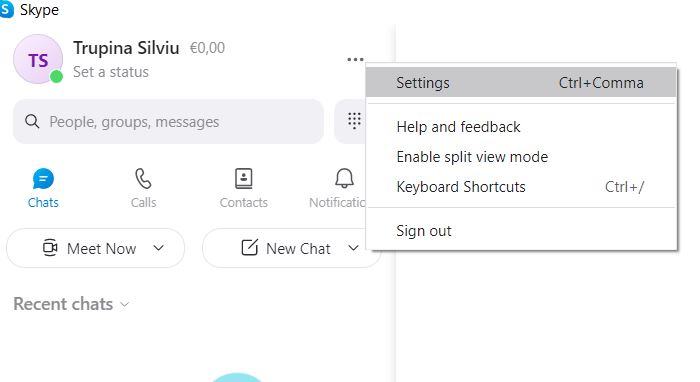
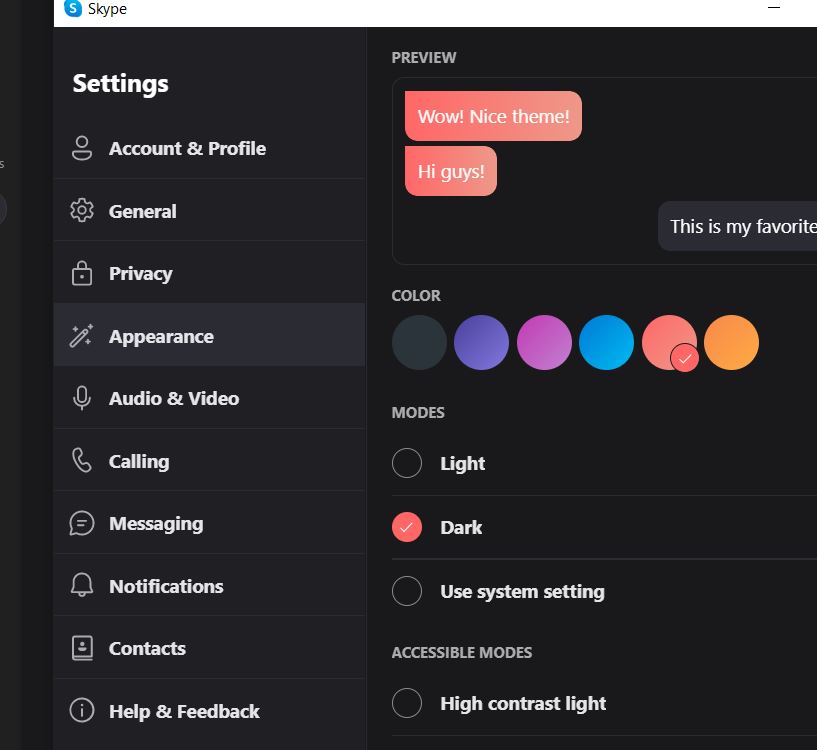
Pași pentru a schimba tema Skype pe Windows 10 Data 14/11/2021 Autor Silviu Trupina Categorie Soluții -6 418 Configurare noua (How To) Situatie Solutie Pasi de urmat 1. Selectați imaginea de profil sau cele trei puncte din dreapta. 2. Selectați Setări și apoi Aspect. 3. Selectați Light sau Dark din Moduri. Și din Color, puteți alege un aspect diferit. Tip solutiePermanent Voteaza Up Down (13 din 32 persoane apreciaza acest articol) ShareTweetShare Despre Autor Silviu Trupina Solutii Asemanatoare Gateway AI centralizat cu LiteLLM – bugete pe echipă, rate limiting și audit pentru toate LLM-urile din companie 0 How to integrate Google Drive with Grok Studio 0 How to fix Visual Studio not starting debugging 0 Cum se instaleaza Dokku pe Debian 11, 12, 13? 0 Email security în SMB 1 Your Android phone’s battery has a limited lifespan 0 Leave A Comment? × Cancel Reply Save my name, email, and website in this browser for the next time I comment. four − = 2
Leave A Comment?
