
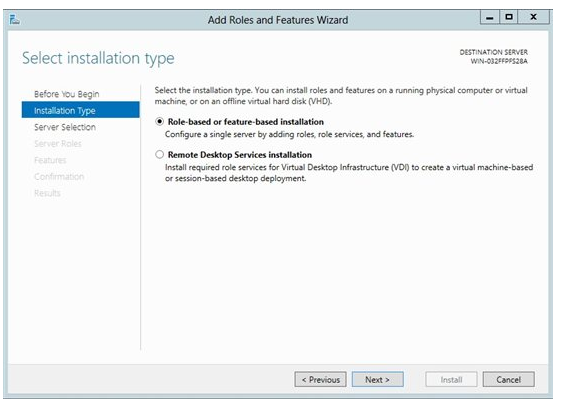
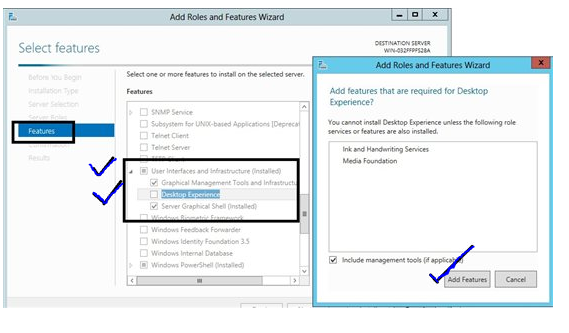
Activare Disk Cleanup Utility in windows server 2012 Data 19/11/2021 Autor Marian Ilascu Categorie Soluții, Windows Server 10 1287 Configurare noua (How To) SituatieAvem nevoie de Disk Cleanup Utility, insa nu este activ pe Windows 2012. Solutie Pasi de urmat Din server manager vom face click pe Add roles and features si next. La tipul instalarii vom alege role base or feature based installation pentru a instala local. Din features vom cauta “User Interface and Infrastructure”, iar aici vom bifa optiunea Desktop Experience. Dupa instalare vom da restart la server, apoi verficam daca a fost instalat si il rulam. Tip solutiePermanent Etichetare: Disk Cleanup UtilityDisk Cleanup Utility in windows server 2012windows server 2012 Voteaza Up Down (40 din 70 persoane apreciaza acest articol) ShareTweetShare Despre Autor Marian Ilascu Solutii Asemanatoare Cum schimbati “Initiator Name” in iSCSI 4 ESP32 Web Server guide 0 Fix Windows without losing your Files 3 6 ways to speed up email management in Outlook 4 Cum selectezi si editezi text dintr-o imagine pe Windows 11 1 My iPhone kept running out of storage—this was the only thing that fixed it 0 Leave A Comment? × Cancel Reply Save my name, email, and website in this browser for the next time I comment. six − 3 =
Leave A Comment?