
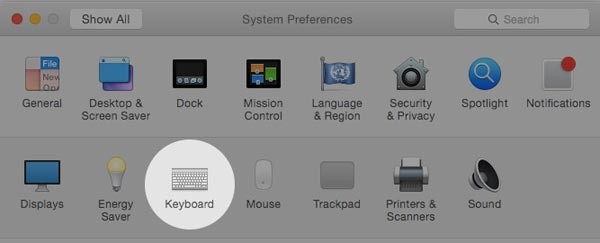
Cum sa dezactivati auto corectarea in MAC OS Yosemite Data 16/09/2015 Autor Calin Maxim Categorie OS - OS X, Stații de lucru -1 1836 Configurare noua (How To) SituatieCum sa dezactivati auto corectarea in MAC OS Yosemite Solutie Pasi de urmat Pasul 1. Apasati pe Apple Menu Pasul 2. Selectati system Preferences Pasul 3. Selectati keyboard Pasul 4. Selectati tabul Text Pasul 5. Dezactivati correct spelling automatically Tip solutiePermanent Voteaza Up Down (40 din 82 persoane apreciaza acest articol) ShareTweetShare Despre Autor Calin Maxim Solutii Asemanatoare Your Android phone’s battery has a limited lifespan 0 5 Samsung settings you should change on every new Galaxy -2 Your Android Status Bar is cluttered with Icons? 0 Go to the bottom of the page in Google Chrome 2 Google Chrome – open a link, and jump to it 0 Shortcut switch to the previous tab in Google Chrome v2 0 Leave A Comment? × Cancel Reply Save my name, email, and website in this browser for the next time I comment. 5 × 4 =
Leave A Comment?