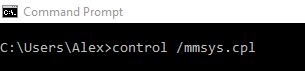
Cum poti deschide Sound and Audio Devices folosind cmd Data 07/04/2019 Autor alexandru corches Categorie Soluții -1 603 Configurare noua (How To) Situatie Solutie Pasi de urmat Accesam Start Menu si deschidem cmd. In cmd introducem urmatoarea comanda: control /mmsys.cpl -Exemplu Dupa introducerea comenzii de mai sus, se va deschide Sound and Audio Devices. Tip solutiePermanent Voteaza Up Down (13 din 27 persoane apreciaza acest articol) ShareTweetShare Despre Autor alexandru corches Solutii Asemanatoare Cum folosești înțelept ChatGPT Atlas 0 Cum optimizezi Firefox pentru placa video și procesor 0 Cum folosești Restore Mode în macOS 0 Remedierea erorii:„Missing DLL File” în sistemele de operare Windows 0 Remedierea erorii:„Device not Migrated” în sistemele de operare Windows 0 Cum adaugati o limba noua pentru aplicatia “Narrator” in Windows 11 -1 Leave A Comment? × Cancel Reply Save my name, email, and website in this browser for the next time I comment. eight − = 7
Leave A Comment?
