
Soluții

Java Wrapper Classes

Java Wrapper Classes
  • Wrapper classes provide a way to use primitive data types (intboolean, etc..) as objects.
  • The table below shows the primitive type and the equivalent wrapper class:
Primitive Data Type Wrapper Class
byte Byte
short Short
int Integer
long Long
float Float
double Double
boolean Boolean
char Character


Sometimes you must use wrapper classes, for example when working with Collection objects, such as ArrayList, where primitive types cannot be used (the list can only store objects):

Example
ArrayList<int> myNumbers = new ArrayList<int>(); // Invalid
ArrayList<Integer> myNumbers = new ArrayList<Integer>(); // Valid
[mai mult...]

Java Regular Expressions

What is a Regular Expression?
  • A regular expression is a sequence of characters that forms a search pattern. When you search for data in a text, you can use this search pattern to describe what you are searching for.
  • A regular expression can be a single character, or a more complicated pattern.
  • Regular expressions can be used to perform all types of text search and text replace operations.
  • Java does not have a built-in Regular Expression class, but we can import the java.util.regex package to work with regular expressions. The package includes the following classes:
  • Pattern Class – Defines a pattern (to be used in a search)
  • Matcher Class – Used to search for the pattern
  • PatternSyntaxException Class – Indicates syntax error in a regular expression pattern
Example

Find out if there are any occurrences of the word “w3schools” in a sentence:

import java.util.regex.Matcher;
import java.util.regex.Pattern;

public class Main {
  public static void main(String[] args) {
    Pattern pattern = Pattern.compile("w3schools", Pattern.CASE_INSENSITIVE);
    Matcher matcher = pattern.matcher("Visit W3Schools!");
    boolean matchFound = matcher.find();
    if(matchFound) {
      System.out.println("Match found");
    } else {
      System.out.println("Match not found");
    }
  }
}
// Outputs Match found
Example Explained

In this example, The word “w3schools” is being searched for in a sentence.

First, the pattern is created using the Pattern.compile() method. The first parameter indicates which pattern is being searched for and the second parameter has a flag to indicates that the search should be case-insensitive. The second parameter is optional.

The matcher() method is used to search for the pattern in a string. It returns a Matcher object which contains information about the search that was performed.

The find() method returns true if the pattern was found in the string and false if it was not found.

Flags

Flags in the compile() method change how the search is performed. Here are a few of them:

  • Pattern.CASE_INSENSITIVE – The case of letters will be ignored when performing a search.
  • Pattern.LITERAL – Special characters in the pattern will not have any special meaning and will be treated as ordinary characters when performing a search.
  • Pattern.UNICODE_CASE – Use it together with the CASE_INSENSITIVE flag to also ignore the case of letters outside of the English alphabet
[mai mult...]

C++ Function Overloading

With function overloading, multiple functions can have the same name with different parameters:

Example
int myFunction(int x)
float myFunction(float x)
double myFunction(double x, double y)
Consider the following example, which have two functions that add numbers of different type:
Example
int plusFuncInt(int x, int y) {
return x + y;
}
double plusFuncDouble(double x, double y) {
return x + y;
}

int main() {
int myNum1 = plusFuncInt(85);
double myNum2 = plusFuncDouble(4.36.26);
cout << “Int: “ << myNum1 << “\n”;
cout << “Double: “ << myNum2;
return 0;
}

[mai mult...]

Cum creezi ferestre de dialog in Microsoft Excel

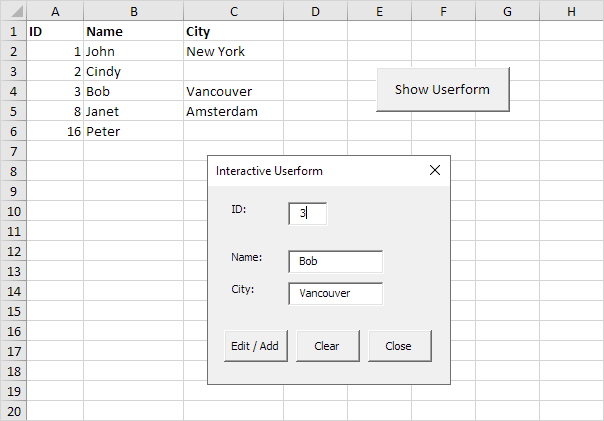
Pentru a imbunatati functionalitatea unui fisier Excel se pot crea ferestre de dialog similare cu cele din Windows, de unde utilizatorul poate selecta anumite optiuni.

De exemplu, vom crea o fereastra din care sa se poata completa o foaie de calcul Excel.

  • In aceasta fereastra, ori de câte ori introduceți o valoare în caseta de text ID, Excel VBA încarcă înregistrarea corespunzătoare. Când faceți click pe butonul Edit/Add, Excel editează înregistrarea de pe foaie sau adaugă înregistrarea când ID-ul nu există încă.
  • Butonul Clear șterge toate casetele de text. Butonul Close închide fereastra de dialog.

Pentru a crea aceasta fereastra de dialog, executați pașii următori.

[mai mult...]

C++ Syntax

Let’s break up the following code to understand it better:

Example
#include <iostream>
using namespace std;
int main() {
cout << “Hello World!”;
return 0;
}

Example explained

Line 1: #include <iostream> is a header file library that lets us work with input and output objects, such as cout (used in line 5). Header files add functionality to C++ programs.

Line 2: using namespace std means that we can use names for objects and variables from the standard library.

Don’t worry if you don’t understand how #include <iostream> and using namespace std works. Just think of it as something that (almost) always appears in your program.

Line 3: A blank line. C++ ignores white space.

Line 4: Another thing that always appear in a C++ program, is int main(). This is called a function. Any code inside its curly brackets {} will be executed.

Line 5: cout (pronounced “see-out”) is an object used together with the insertion operator (<<) to output/print text. In our example it will output “Hello World”.

Note: Every C++ statement ends with a semicolon ;.

Note: The body of int main() could also been written as:
int main () { cout << "Hello World! "; return 0; }

Remember: The compiler ignores white spaces. However, multiple lines makes the code more readable.

Line 6: return 0 ends the main function.

Line 7: Do not forget to add the closing curly bracket } to actually end the main function.

[mai mult...]