How to Convert OneNote Notes to a PDF on Windows 10
If you want to share your OneNote notes with someone who doesn’t have OneNote, or if you want to prevent accidental editing of your notes, convert them to a PDF file.
[mai mult...]
Soluții pentru problemele tale IT

If you want to share your OneNote notes with someone who doesn’t have OneNote, or if you want to prevent accidental editing of your notes, convert them to a PDF file.
[mai mult...]Pentru a face un Schedule este mai intai nevoie sa cream un script pentru backup:
Vom folosi urmatorul script:
:log info “Starting backup”;
/system backup save name=Mikrotik
/system package print file Mikrotik_Version.txt
:delay 00:00:01
/ export file Mikrotik
:delay 00:00:10
/tool e-mail send file=Mikrotik.rsc,Mikrotik.backup,Mikrotik_Version.txt from=”Mikrotik_backup” to=”exemplu@domeniu.tld” body=”Router script, backup and version files attached.” \
subject=”Mikrotik $[/system clock get date] at $[/system clock get time] Backup”
:log info “Backup script completed”
Dorim sa facem backup automat pe un router mikrotik si dorim sa fie transmis pe email. Inainte de a crea script-ul pentru backup este necesar sa configuram mail-ul, ne putem folosi de acest tutorial:
[mai mult...]
Poţi alege cum vei primi notificări despre noutăţile de la prieteni.
[mai mult...]
When you want to change the font style in Google Docs, use the Font drop-down box in the toolbar.
Click the “Font” drop-down and pick the “More Fonts” option.
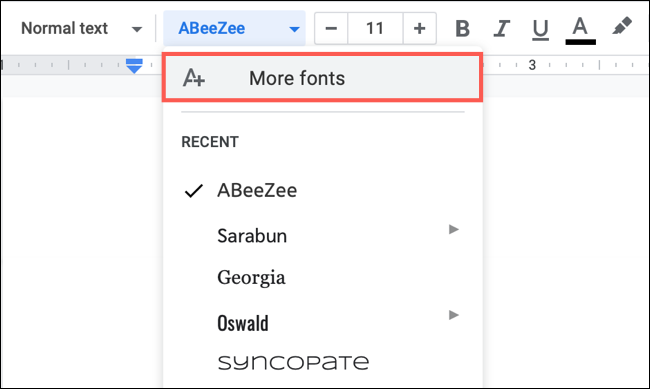
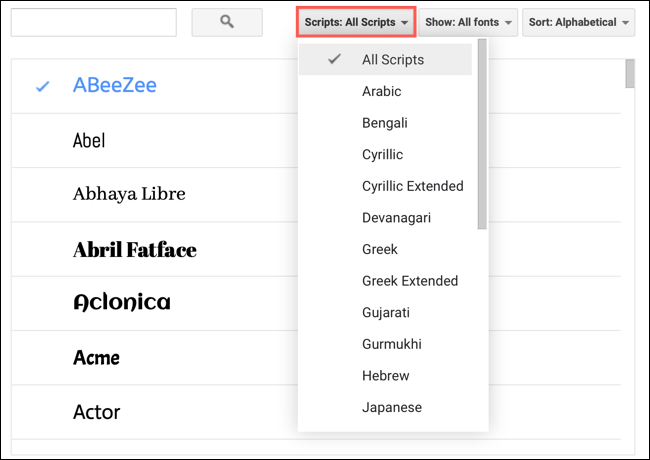
You’ll then see a pop-up window where you can find, add, or remove the fonts in the drop-down list.

Use the Search box at the top left if you have a particular font style in mind. You can search for a specific name to see whether it’s available. In the first drop-down menu to the right of the search, “Scripts,” you can select fonts for languages.
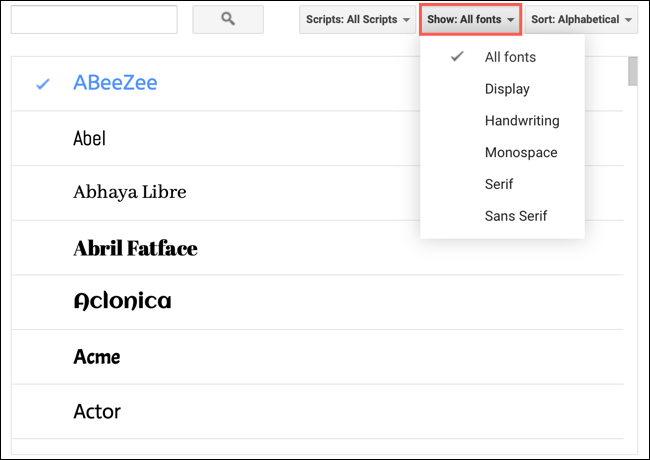
In the “Show” menu, you can filter font styles by “Display,” “Handwriting,” “Monospace,” “Serif,” or “Sans Serif.”
Finally, in the “Sort” menu, you can sort the fonts by popularity, alphabetical order, date added, or what’s trending.
