
Soluții

How to easily check if an email is legit or a scam

I spend a few minutes every morning blocking and unsubscribing from lists that send irrelevant messages. Because my email address is public, most of these messages are unsolicited; a few might even be dangerous. Fortunately, the more we take advantage of the internet, the better equipped we are to deal with messages that aren’t what they claim to be. The solution is always prevention. In this article, I’ll discuss a few guidelines that will help you discern whether an email message might have the potential to damage your system.

[mai mult...]
How to improve network speed in Windows 10 by increasing IRPStackSize

It doesn’t matter whether you are working at the office or remotely, a high-performance network connection is vital to your productivity. This simple fact is why so many people working from home offices have opted to purchase high speed broadband internet connections. But getting the fastest internet connection does not guarantee a high-performance network—the are other factors to consider.

The default network configuration settings in Microsoft Windows 10 are notorious for being programmed to what are considered safe, stable values. Predictably, safe and stable does not always equal fast and high-performance, especially with regard to network connections. This tutorial shows you how to edit the Windows 10 Registry file to change an obscure setting known as IRPStackSize. Increasing that parameter’s value should considerably increase the overall network performance of your Windows 10 personal computer.

[mai mult...]

How to enable Tab Scrolling in Microsoft Edge

Microsoft Edge is a Chromium-based web browser, and as such limited to the same default tab handling mechanics as other Chromium-based browsers. By default, tabs get smaller and smaller the more you open, but there is no option to scroll them. Microsoft did introduce support for vertical tabs in the recent release of Edge 89 Stable, and the feature is suggested to users when too many tabs are opened. If you prefer to use a horizontal tab bar on the other hand, you are left with little when it comes to managing lots of tabs in Edge. You could install a browser extension to improve tab management, or, if you run the Canary version, enable tab scrolling.

Tab Scrolling is not a feature that Microsoft added to the browser; instead, it is a feature that is added to the Chromium core. You can enable it in Google Chrome development versions right now, but when you check the flags page in Edge, you will notice that the flag is missing. It appears that Microsoft did remove it, but not all is lost, as you can still enable the feature in Edge Canary.

All you need to do is add a startup parameter to Microsoft Edge to enable it in the browser.

Here is how that is done:

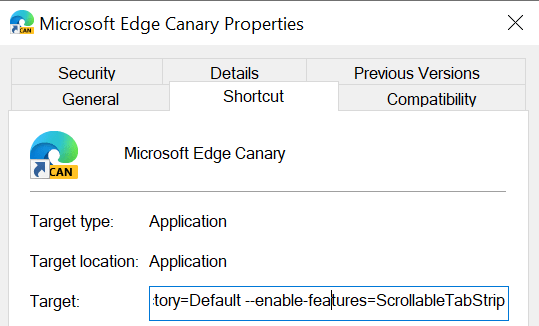
Right-click on the Edge icon on the taskbar, right-click again on Microsoft Edge, and select Properties from the menu.
Locate the target field, add a space at the end, and paste the following parameter afterwards:

–enable-features=ScrollableTabStrip
It should show up like that (apart from the username “example”): “C:\Users\example\AppData\Local\Microsoft\Edge SxS\Application\msedge.exe” –enable-features=ScrollableTabStrip
Click on OK to save the change.
Restart Microsoft Edge Canary.
Once restarted, the following things happen:

  • Edge does not reduce the width of tabs below a minimum threshold anymore (that is larger than the default).
  • Not all tabs may be visible anymore at once because of that.
  • You may use the mousewheel to scroll tabs in the browser’s tab bar when you hover the cursor over the bar.

Note: the feature is experimental at this point in time. It is possible that Microsoft is removing support for it entirely in the browser, or that it is adding support for it at one time. For now, it works in development versions of Edge but not in stable versions.

[mai mult...]