
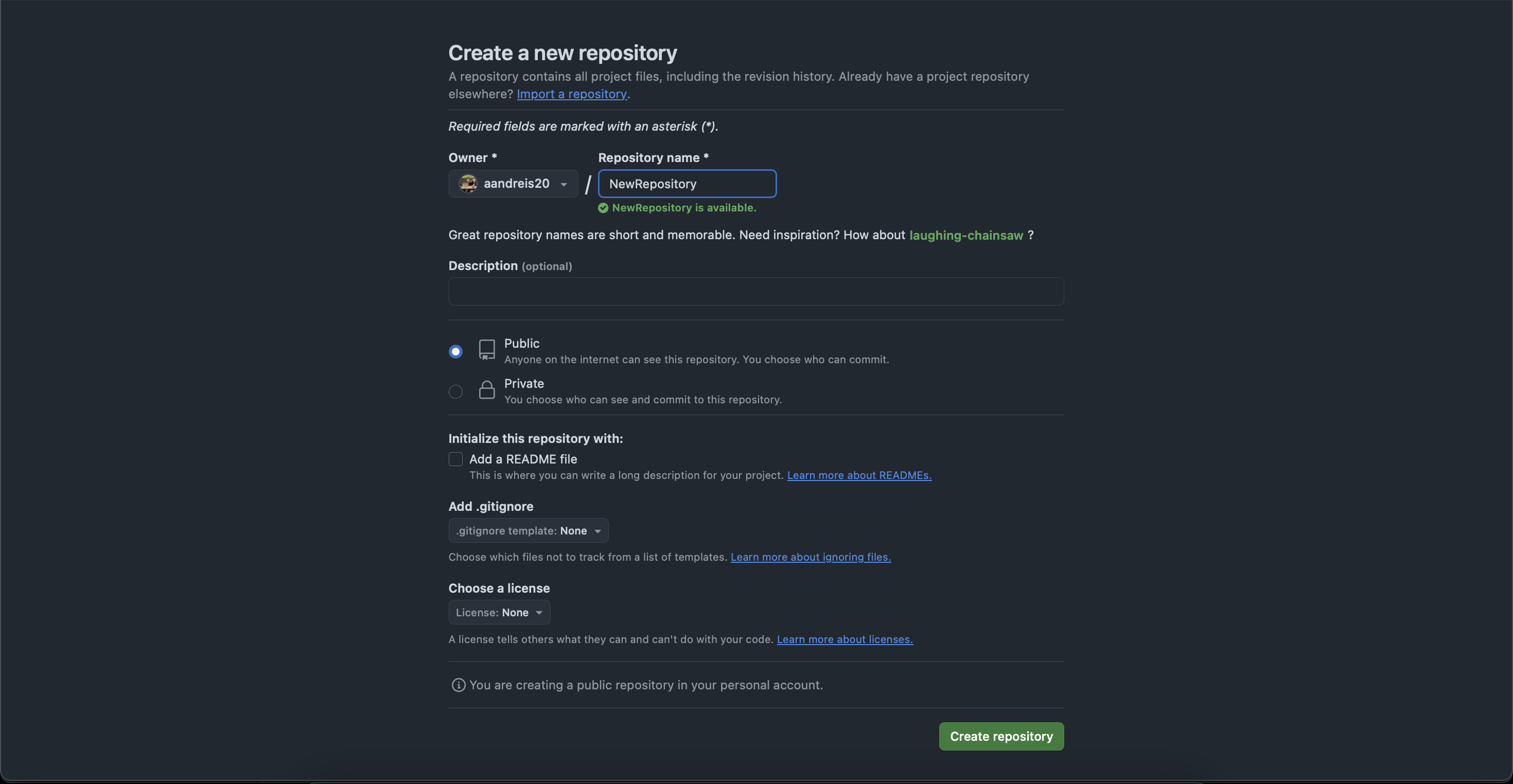
Cum se creează un nou repository pe github Data 22/05/2025 Autor Andrei Stanciu Categorie Soluții -3 140 Configurare noua (How To) Situatie Solutie Pasi de urmat Mergem la pagina profilului nostru si selectam tab-ul “Repositories” Apasam pe butonul de “New” Completam datele despre noul repository si apasam pe “Create repository” Repository-ul nostru a fost creat si il putem gasi in lista. Tip solutiePermanent Voteaza Up Down (4 din 12 persoane apreciaza acest articol) ShareTweetShare Despre Autor Andrei Stanciu Solutii Asemanatoare iOS 26: Switch back to the classic Phone App layout 2 How to enable Windows Recall 0 Cum schimbati tipul de encryption din 128-bit in 40-or 56-bit pentru “File sharing connections” 4 Ai uitat parola de la Wi-Fi? O poti recupera in Command Prompt 1 Cum iti creezi propriul buton de curățare a memoriei RAM 1 Activează „God Mode” în Windows: toate setările ascunse într-un singur folder 4 Leave A Comment? × Cancel Reply Save my name, email, and website in this browser for the next time I comment. three − = two



Leave A Comment?