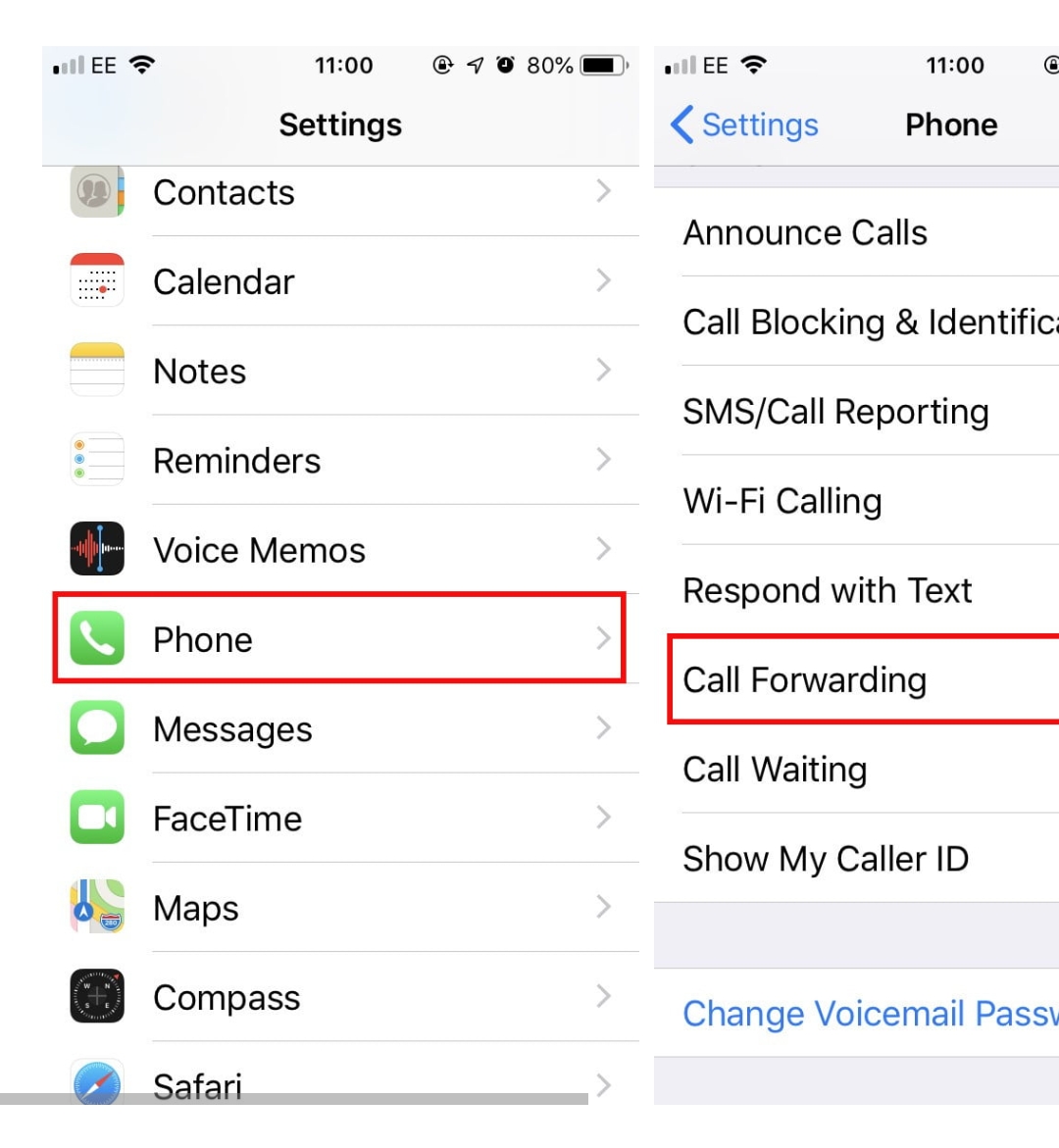
How to forward calls on an Iphone Data 13/05/2022 Autor Cristian Enache Categorie Soluții 0 455 Configurare noua (How To) Situatie Open the Settings menu Scroll down and tap on Phone. Scroll down and select Call Forwarding. Toggle Call Forwarding Enter the number you want to forward calls to. Solutie Tip solutiePermanent Voteaza Up Down (29 din 57 persoane apreciaza acest articol) ShareTweetShare Despre Autor Cristian Enache Solutii Asemanatoare 3 annoying Windows apps you can replace with an Excel spreadsheet 1 3 Linux commands you’ve overlooked for too long 0 Cum schimbam automat fundalul in Windows in funcție de zi și noapte 1 Cum redimensionam si convertim imagini instant direct din Windows File Explorer 1 How to turn your Raspberry Pi into an Android TV box 5 Aflarea resurselor libere pe ESXi direct din SSH/CLI 0 Leave A Comment? × Cancel Reply Save my name, email, and website in this browser for the next time I comment. four × = 32

Leave A Comment?