
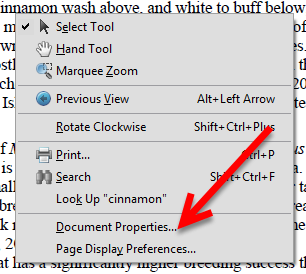
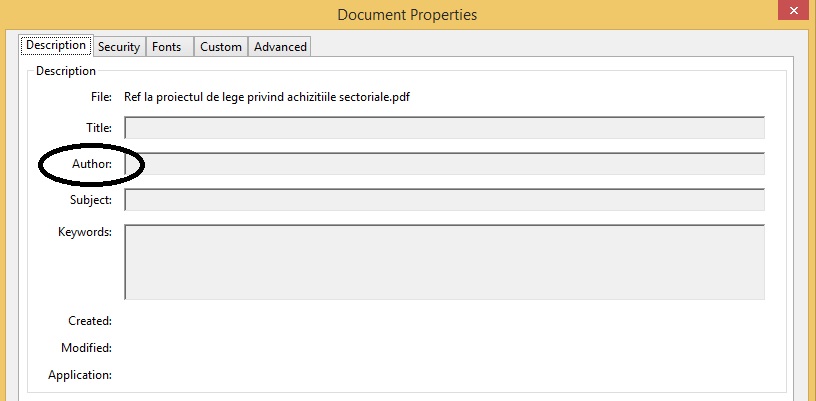
Cum putem vedea autorul unui PDF Data 04/11/2015 Autor Mihnea I Categorie Aplicatii specifice, Stații de lucru -8 1729 Configurare noua (How To) SituatieVrei sa vezi cine a creat un PDF Solutie Pasi de urmat Deschidem documentul PDF dorit pentru a aflat autorul acestuia Dam clic dreapta oriunde in documentul pdf Si selectam “Document Properties” In primul tab “Description” putem vedea autorul documentului: Tip solutiePermanent Voteaza Up Down (23 din 54 persoane apreciaza acest articol) ShareTweetShare Despre Autor Mihnea I Solutii Asemanatoare ESP32 Web Server guide 0 6 ways to speed up email management in Outlook 5 Cum configurati un server privat de chat vocal Mumble pe Windows 11? 1 How to install Discord on Ubuntu 24.04 3 Kaspersky Antivirus vs Bitdefender: which one should you choose in 2026 2 ESP32 Offline Text-to-Speech 3 Leave A Comment? × Cancel Reply Save my name, email, and website in this browser for the next time I comment. + four = 7
Leave A Comment?