
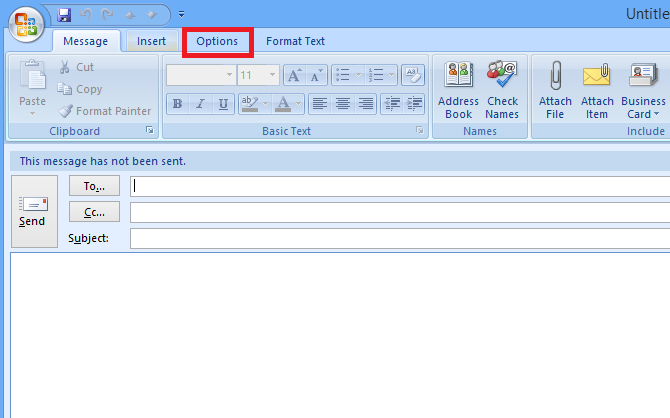
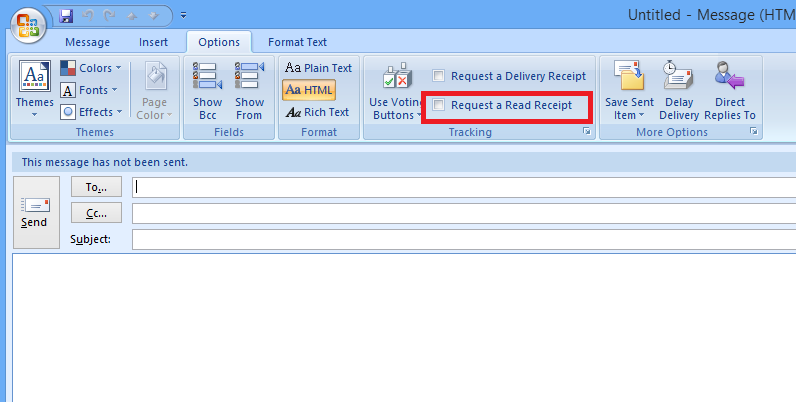
Confirmare citire email (Outlook 2007) Data 15/09/2014 Autor Mihai P Categorie E-mail, Aplicații 13 9788 Configurare noua (How To) SituatieSe doreste trimiterea unui email din Outlook 2007 si este necesara transmiterea optiunii de confirmare de citire a email-ului. Solutie Pasi de urmat Se deschide Outlook si se creaza un email nou. Se da click pe tab-ul Options Se selecteaza Request a Read Receipt Tip solutiePermanent Etichetare: Confirmare citire emailOutlook 2007Read Request Receipt Voteaza Up Down (158 din 304 persoane apreciaza acest articol) ShareTweetShare Despre Autor Mihai P Solutii Asemanatoare Cum modernizam si controlam volumul pentru fiecare aplicatie in Windows 10 2 Cum salvam si accesam istoricul complet de Copy/Paste in Windows 10 2 Your Android phone’s battery has a limited lifespan 0 5 Samsung settings you should change on every new Galaxy 2 Your Android Status Bar is cluttered with Icons? 0 Procedură răspuns phishing M365 fără Defender (EOP) -2 Leave A Comment? × Cancel Reply Save my name, email, and website in this browser for the next time I comment. × 3 = 3
Leave A Comment?