
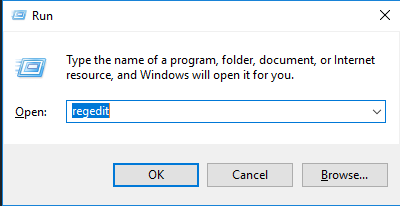
Cum se dezactiveaza butonul Quick Actions din Action Center Data 11/09/2016 Autor Cristian V Categorie Aplicații -9 1996 Configurare noua (How To) SituatieDorim sa dezactivam butonul Quick Actions din Action Center Solutie Pasi de urmat Apasam WIN + R si scriem regedit Navigam cheia de registri HKEY_LOCAL_MACHINESOFTWAREMicrosoftShellActionCenterQuick Actions In partea dreapta, modificam valoarea cheii PinnedQuickActionSlotCount cu 0. Tip solutiePermanent Etichetare: Action Centeraskitaskit.roCum se dezactiveaza butonul Quick Actions din Action CenterQuick Actionsregeditvaloarea cheii PinnedQuickActionSlotCount cu 0Win + R Voteaza Up Down (38 din 86 persoane apreciaza acest articol) ShareTweetShare Despre Autor Cristian V Solutii Asemanatoare Your Android phone’s battery has a limited lifespan -1 5 Samsung settings you should change on every new Galaxy -2 Your Android Status Bar is cluttered with Icons? -3 Procedură răspuns phishing M365 fără Defender (EOP) -3 Activarea funcției de recuperare/Recall al mesajelor între chiriași/tenant în Exchange Online -1 Here are some other ways to use the power button on a Samsung Galaxy phone 6 Leave A Comment? × Cancel Reply Save my name, email, and website in this browser for the next time I comment. 5 × 4 =
Leave A Comment?