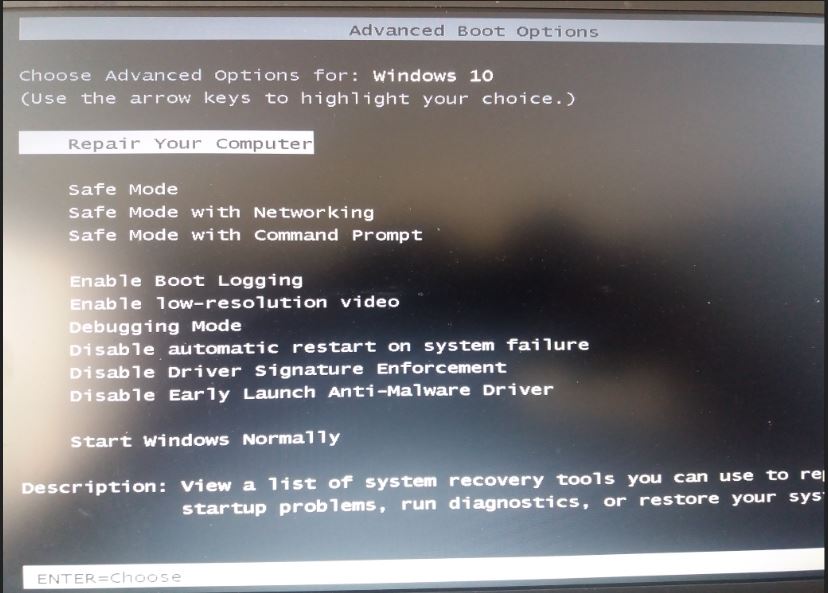
Cum activez tasta F8 in windows 10 Data 19/06/2018 Autor Cristian N. Categorie OS - Windows -11 1096 Configurare noua (How To) SituatieVreau sa activez vechiul meniu de boot in windows 10 prin apasarea tastei F8 cind porneste sistemul. Aceasta optiune este dezactivata in Windows 10 dar se pote active din CMD. Solutie Deschizi CMD ca administrator Scrii urmatoare commanda bcdedit /set {default} bootmenupolicy legacy Dai restart si apoi poti accesa maniul cu tasta F8 Tip solutiePermanent Voteaza Up Down (27 din 65 persoane apreciaza acest articol) ShareTweetShare Despre Autor Cristian N. Solutii Asemanatoare Stop using Rufus to burn ISOs, these 2 tools for Windows and Linux are better 4 Tuxedo OS install guide 1 Spyware-ul pe înțelesul tuturor: cum îl eviți? 3 How to enable hidden CPU performance boost mode on Windows 11 3 Cum remediem: you can’t Sign in with this account error In Windows 11 1 Remediere: ASSIGN_DRIVE_LETTERS_FAILED 2 Leave A Comment? × Cancel Reply Save my name, email, and website in this browser for the next time I comment. one × = 8
Leave A Comment?