
Soluții

How to Backup Kubernetes MySQL Operator Clusters

Oracle’s MySQL Operator for Kubernetes is a convenient way to automate MySQL database provisioning within your cluster. One of the operator’s headline features is integrated hands-off backup support that increases your resiliency. Backups copy your database to external storage on a recurring schedule.

This article will walk you through setting up backups to an Amazon S3-compatible object storage service. You’ll also see how to store backups in Oracle Cloud Infrastructure (OCI) storage or local persistent volumes inside your cluster.

[mai mult...]
How to Use Kubernetes Taints and Tolerations to Avoid Undesirable Scheduling

Taints and tolerations are a Kubernetes mechanism for controlling how Pods schedule to the Nodes in your cluster. Taints are applied to Nodes and act as a repelling barrier against new Pods. Tainted Nodes will only accept Pods that have been marked with a corresponding toleration.

Taints are one of the more advanced Kubernetes scheduling mechanisms. They facilitate many different use cases where you want to prevent Pods ending up on undesirable Nodes.

[mai mult...]

How to Install Notepad++ on Linux

Notepad++ isn’t supported on Linux but you can run it using Wine, a Windows emulator. There’s a snap package that wraps Notepad++, Wine, and all dependencies in an easy-to-install package. But you might be better off considering an alternative Linux-native editor. Notepad++ is a popular editor on Windows, but it doesn’t have official Linux support.
[mai mult...]

[Fix] Error 0x800F0954 Installing .NET Framework 3.5 or Any Optional Feature

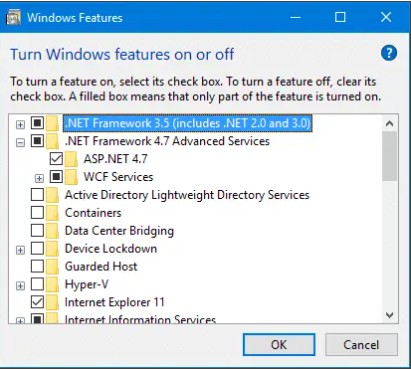
When you attempt to install .NET Framework 3.5 or any other optional feature using “Windows Features” (optionalfeatures.exe) dialog or using DISM command-line, error 0x800F0954 may popup.

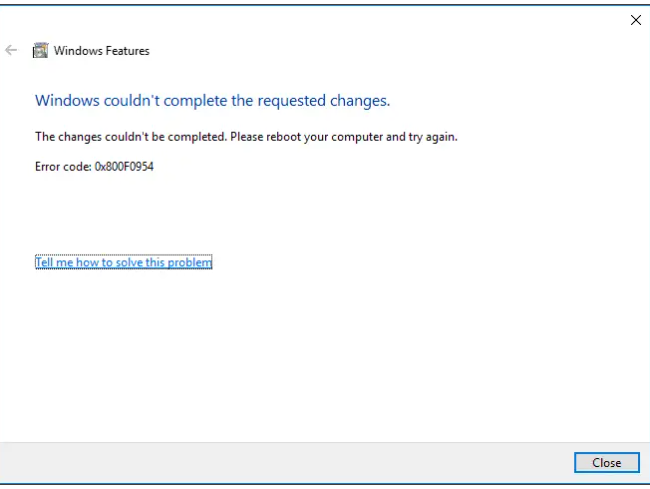
After enabling .NET Framework 3.5 and clicking OK, the following error may appear:

Windows couldn’t complete the requested changes.

The changes couldn’t be completed. Please reboot your computer and try again.

Error code: 0x800F0954

The same error may occur when attempting to install additional speech recognition or supplemental fonts using Optional features in the Settings page or using DISM command-line. For instance, you run the following command to install .NET Framework 3.5 from an elevated or administrator Command Prompt.

DISM /Online /Enable-Feature /FeatureName:NetFx3 /All

After pressing ENTER, here is the full error message you might see:

Deployment Image Servicing and Management tool
Version: 10.0.16299.15
Image Version: 10.0.16299.192
Enabling feature(s)
[==========================100.0%==========================]
Error: 0x800f0954
DISM failed. No operation was performed.
For more information, review the log file.
The DISM log file can be found at C:\Windows\Logs\DISM\dism.log

The DISM.log file would show these entries/errors:

xxxx, Info                  DISM   DISM Package Manager: PID=12956 TID=12296 Further logs for online package and feature related operations can be found at %WINDIR%\logs\CBS\cbs.log - CPackageManagerCLIHandler::ExecuteCmdLine
xxxx, Error                 DISM   DISM.EXE: DISM Package Manager processed the command line but failed. HRESULT=800F0954

And the CBS.log file would have recorded these errors:

xxxx, Info                  CBS    DWLD:Failed to do Windows update search [HRESULT = 0x800f0954 - CBS_E_INVALID_WINDOWS_UPDATE_COUNT_WSUS]
xxxx, Info                  CBS    FC:   WindowsUpdateDownloadFromUUP returns. [0x800F0954]

Note that the error 0x800f0954 refers to CBS_E_INVALID_WINDOWS_UPDATE_COUNT_WSUS which indicates that your system might have been configured to use a WSUS server (on your domain network) to get updates instead of connecting to Windows Update servers directly.

[mai mult...]