Soluții

How to Change the Accent and Highlight Colors on Your Mac

Unlike Windows, there’s not a lot of customization you can do to make your Mac’s software look different from everyone else’s. But you can add some personality by changing the accent and highlight colors on your Mac. Here’s how! Mac owners running macOS Mojave or higher can choose from eight different accents and highlight colors to customize the look of their operating system. You can also set the accent and highlight colors independently.

[mai mult...]

Retrieve the position (X,Y) of an element using HTML

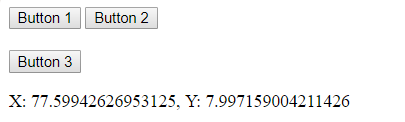
The position of (X, Y) means the co-ordinate of an element at the top-left point in a document. X represent the horizontal position and Y represent the vertical position. Use element.getBoundingClientRect() property to get the position of an element.

Example 1:

<!– HTML program to get (x, y) coordinate
of an element relative to the viewport –>
<!DOCTYPE html>
<html>
<head>
<title>
position of an element
</title>

<!– JavaScript code to display position –>
<script type=”text/javascript”>

function getPositionXY(element) {
var rect = element.getBoundingClientRect();
document.getElementById(‘gfg’).innerHTML =
‘X: ‘ + rect.x + ‘, ‘ + ‘Y: ‘ + rect.y
}
</script>
</head>

<body>

<!– Click on button to get its co-ordinate –>
<button id = ‘button1’ onclick = “getPositionXY(this)”>
Button 1
</button>

<button id = ‘button1’ onclick = “getPositionXY(this)”>
Button 2
</button>

<br><br>
<button id = ‘button1’ onclick = “getPositionXY(this)”>
Button 3
</button>

<p id = ‘gfg’></p>

</body>
</html>

Output:

[mai mult...]