How to activate dark mode in Vivaldi browser
Sometimes too much light can be annoying and tiring, especially if you are working much on the computer. Check the steps below to see how you can enable dark mode for the Vivaldi browser.
[mai mult...]
Soluții pentru problemele tale IT

Sometimes too much light can be annoying and tiring, especially if you are working much on the computer. Check the steps below to see how you can enable dark mode for the Vivaldi browser.
[mai mult...]Given an array of elements, we have to delete an element from the array by using the unset() function.
Input : $arr = array(1, 2, 6, 7, 8, 9);
unset($arr[3]);
Output : Array
(
[0] => 1
[1] => 2
[2] => 6
[4] => 8
[5] => 9
)
Private browsing mode is a mode in Firefox that does not store your browsing history, download history, filled-out forms, searches, and other types of local data between browser sessions. (A browser session ends when you completely close all Firefox windows.)
Firefox will not store your browsing history even within the browser session either, aside from a list of recently closed tabs that gets reset when you fully exit Firefox.
[mai mult...]InPrivate is the name of Microsoft Edge’s private browsing mode. While using InPrivate, Edge deletes your local browsing history when you close all browser windows. Your bookmarks and downloaded files will be preserved unless you delete those manually. It also prevents Bing searches from being associated with your Microsoft account.
[mai mult...]
Google Play Music is going away. Google’s first music service will be shut down by December 2020. To keep your data, you’ll have to switch to YouTube Music—or download it. Here’s what you need to know.
Google has announced that “YouTube Music will replace Google Play Music by December 2020.” YouTube Music is Google’s replacement for Google Play Music. It appears to have the same big library of streaming music, but the interface is changing—and the app you’ll use to stream is changing, too. Google has been adding features from Google Play Music to YouTube Music, including the ability to upload and stream your own songs.
You will no longer be able to use the Google Play Music app to stream music starting October 2020. (The cutoff date is September 2020 in New Zealand and South Africa.) If you’re currently paying for a Google Play Music subscription and don’t transfer your account, Google will cancel your subscription at the end of your billing cycle in October (or September in New Zealand sn South Africa.)
However, you will be able to transfer everything you have in Google Play Music—your playlists, music uploads, purchases, and likes—to YouTube Music. The transfer service will be available through the end of December 2020.
After December 2020, Google will delete your Google Play Music data from its servers.
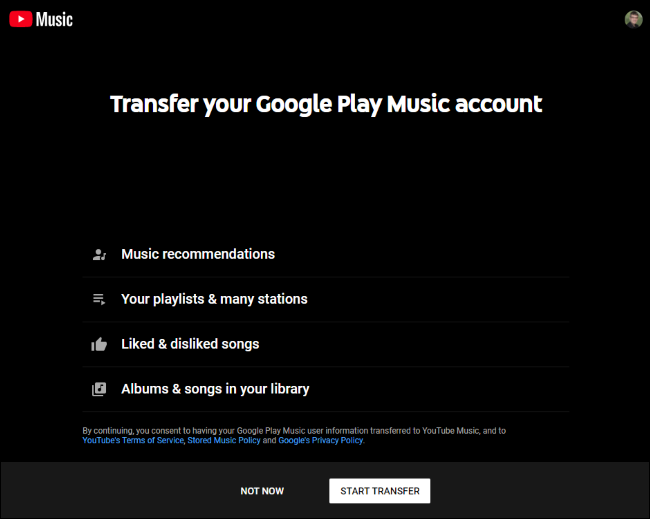
You can transfer your Google Play Music account by using Google’s YouTube Music transfer tool. This is a one-time transfer process that will migrate all your Google Play Music data to YouTube Music. Visit the web page and click “Start Transfer.”
Whether you subscribe to Google Play Music’s streaming library or you’ve uploaded some of your own songs and you use Google Play Music to listen to them—or both—you can continue using YouTube Music to play your music after the switch.
If you’re an existing subscriber, you’ll now be billed through YouTube but your monthly subscription price and benefits will stay the same (“unless you are in a location with fluctuating currency,” according to Google.) Even if YouTube now charges extra for the benefits you’re paying for, you’ll keep any discounts you have.
After you’ve switched, head to the YouTube Music website and use the YouTube Music apps for Android, iPhone, and iPad to stream your music.
If you’re done with Google’s music services, you can also download any uploaded music and take it with you.
Until late August 2020, you can still use the Google Play Music Manager application to download your uploaded music files from Google Play Music.
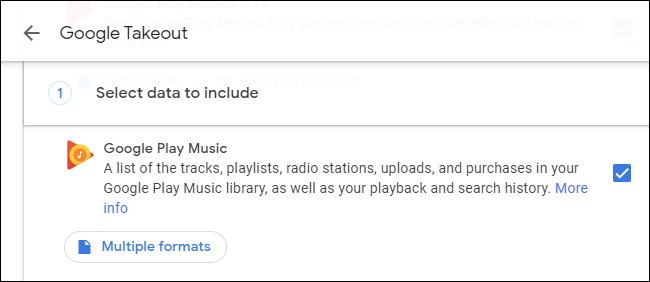
You can also use Google Takeout to download your Google Play Music data and take it with you. Ensure “Google Play Music” is checked to download everything—from a list of all the songs you’ve added to your library to any music files you’ve uploaded. Google Takeout should work until Google Play Music shuts down at the end of December 2020.
On Microsoft Edge, the Sleeping Tabs is a feature designed to reduce memory, processor, and other resources usage. When you enable the feature, open tabs will go into a sleep mode after some time of inactivity to free up resources to improve performance and battery life. The next time you switch to the website, the tab will resume automatically.
[mai mult...]