Soluții

Activați AVIF support în Mozilla Firefox

Începând cu Mozilla Firefox 77(versiune beta momentan) este posibil să activați suportul formatului de imagine AVIF în browser. Acest lucru poate fi util pentru site-urile web care utilizează în mod activ acest format modern pentru a furniza conținut multimedia bogat utilizatorului final.

[mai mult...]

C++ for loop

for loop is a repetition control structure that allows you to efficiently write a loop that needs to execute a specific number of times.

The syntax of a for loop in C++ is −

for ( init; condition; increment ) {
   statement(s);
}

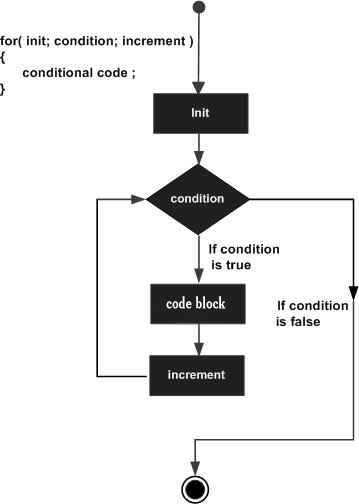
Here is the flow of control in a for loop −

  • The init step is executed first, and only once. This step allows you to declare and initialize any loop control variables. You are not required to put a statement here, as long as a semicolon appears.
  • Next, the condition is evaluated. If it is true, the body of the loop is executed. If it is false, the body of the loop does not execute and flow of control jumps to the next statement just after the for loop.
  • After the body of the for loop executes, the flow of control jumps back up to the increment statement. This statement can be left blank, as long as a semicolon appears after the condition.
  • The condition is now evaluated again. If it is true, the loop executes and the process repeats itself (body of loop, then increment step, and then again condition). After the condition becomes false, the for loop terminates.


[mai mult...]

Ce versiune de Outlook am?

Cu atât de multe aplicații și servicii Outlook, poate fi derutant să știți ce versiune utilizați. Pentru a afla care este acesta, alegeți modul în care accesați Outlook:

În Outlook, alegeți Fișier.

  1. Selectați Cont Office. Dacă nu vedeți opțiunea Cont Office, alegeți Ajutor. Veți vedea versiunea produsului în partea dreaptă a paginii.
  2. Veți găsi numărul dvs. de versiune și compilare sub Informații produs. De exemplu, a ta poate enumera Aplicații Microsoft 365 pentru întreprindere și puteți vedea ce aplicații conține după pictogramele lor.
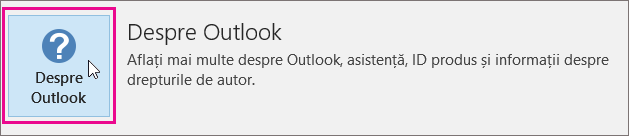
  3. În cazul în care trebuie să aflați dacă utilizați versiunea de Outlook pe 32 de biți sau pe 64 de biți, selectați Despre Outlook.

[mai mult...]