Soluții

How to increase the number of Remote Desktop Connections in Windows 10

In general, Windows 10 lets you establish only one Remote Desktop Connection on one computer. However, with a few tweaks, you can establish more than one Remote Desktop Connections on a Windows system.

How many connections can you establish via RDP?

In normal conditions, Windows 10 restricts the number of users who can connect via Remote Desktop Connection. By default, this number is 1. If another user tries to connect when one Remote Desktop Connection is already established, then the new user gets an error message. The error message says-

Another user is signed in. If you continue, they’ll be disconnected. Do you want to sign in any way?

  • To avoid this, you can increase the number of users who can log into Remote Desktop service simultaneously.
  • Increase the number of Remote Desktop Connections
  • Need to allow multiple Remote Desktop Connections in Server? You can allow more than two RDP sessions in Windows 10 by making use of a Group Policy setting.
  • Here are the steps with the help of which you can increase or limit the number of Remote Desktop Connections in Windows 10.
[mai mult...]

How to make a video smaller with the Windows 10 built-in Video Editor app

Do you have a video that you want to send to someone over the internet, but it is too big to do it via email, chat apps, or other similar services? Do you have to record your homework and upload it on an e-learning platform so that your teacher can grade you? You might stumble upon an annoying size limitation that doesn’t let you do that, simply because your Full HD video is too large. Regardless of your reasons, if you want to learn how to make a video smaller, in terms of size, read this guide.

Windows 10 comes bundled with one handy video editing app called simply Video Editor. Open it and load the video that you want to make smaller.

[mai mult...]

How to change the formatting of the complete PowerPoint Presentation

Formatting is an essential part of a PowerPoint presentation. You need to make sure that all the slides have the same format, so the presentation looks professional. However, if you have imported slides from another PPT, they adhere to the source formatting. The good thing is that you don’t need to fix the format one by one. Instead, you can change the formatting of the complete PowerPoint Presentation. In this post, we will show how you can use the Master View concept for the format to achieve the same.

Change the formatting of the complete PowerPoint Presentation

[mai mult...]

Fix MSN Page opens on Startup of Windows 10 in Chrome

popup-dialog-on-windows-10-startup

The problem gets worse if you check ‘Always use this app’ on that dialog, which adds this link http://go.microsoft.com/fwlink/?LinkID=219472&clcId=0x409 to the command line of Chrome shortcut. Visit chrome://version page to check if that’s also the case with you.

Once that happens, MSN page will automatically load in new tabs of Chrome randomly without your knowledge and sometimes. Chrome browser automatically launches without you opening it after the start of computer.

msn-site-opened-in-a-chrome-browser-tab
[mai mult...]

How To Copy Specific File Types While Keeping Directory Structure In Linux

This brief tutorial explains how to copy specific file types while keeping the directory structure in Linux. Here I have given two different ways to do this. Just pick any one that works for you.

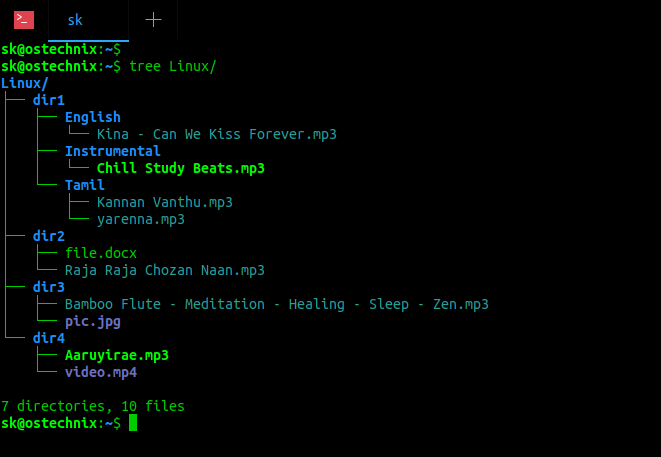
Copy Specific File Types While Keeping Directory Structure In Linux. I have a directory named Linux with different type of files saved in different sub-directories. Have a look at the following directory structure:

$ tree Linux/ Linux/ ├── dir1 │   ├── English │   │   └── Kina – Can We Kiss Forever.mp3 │   ├── Instrumental │   │   └── Chill Study Beats.mp3 │   └── Tamil │   ├── Kannan Vanthu.mp3 │   └── yarenna.mp3 ├── dir2 │   ├── file.docx │   └── Raja Raja Chozan Naan.mp3 ├── dir3 │   ├── Bamboo Flute – Meditation – Healing – Sleep – Zen.mp3 │   └── pic.jpg └── dir4 ├── Aaruyirae.mp3 └── video.mp4 7 directories, 10 files List directory contents using tree command
As you see in the above directory structure, the Linux directory has four sub-directories namely dir1, dir2, dir3 and dir4. The mp3 files are scattered across all four sub-directories. Now, I want to copy all mp3 files to another directory named ostechnix and also I want to keep the same directory structure in the target directory.

First we will see how to do this using “find” command.

[mai mult...]

Export contacte device iOS utilizand iCloud

Exportarea contactelor de pe un device iOS utilizand iCloud:

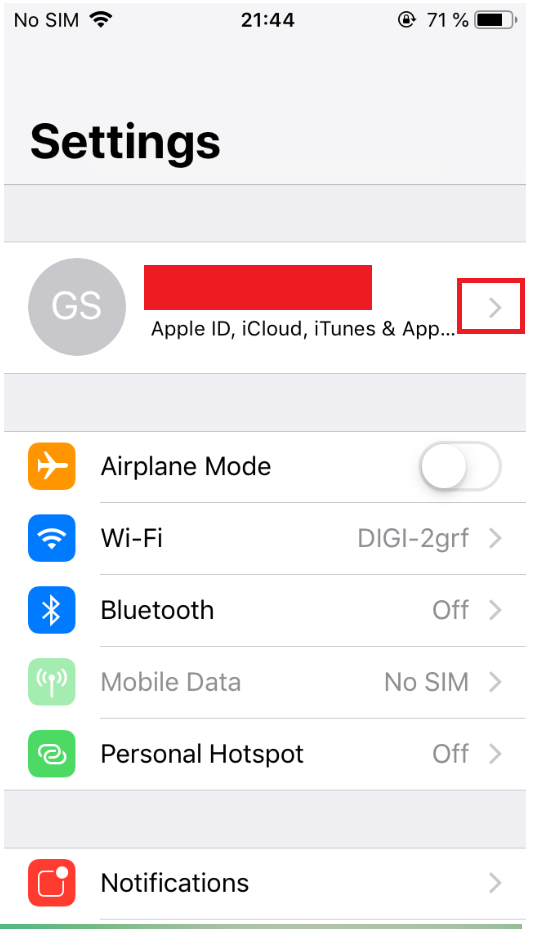
  • Accesam setarile telefonului (pentru exemplul dat):

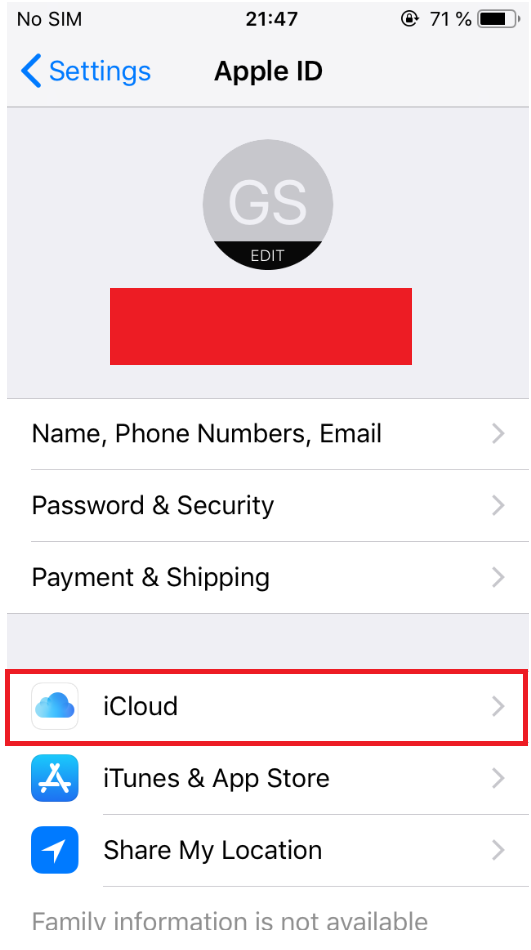
  • Accesam Apple ID, iCloud, iTunes $ App apasand pe sageata (ar trebui sa apara contul Apple):

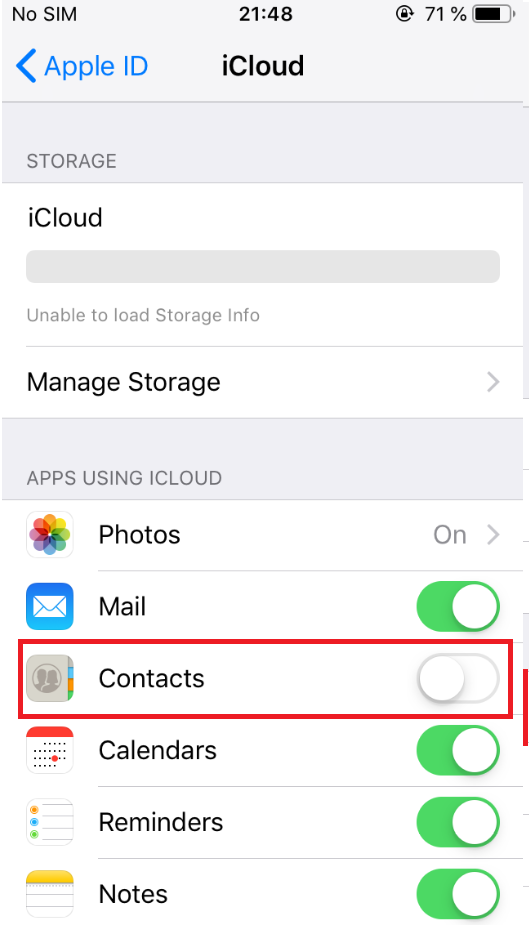
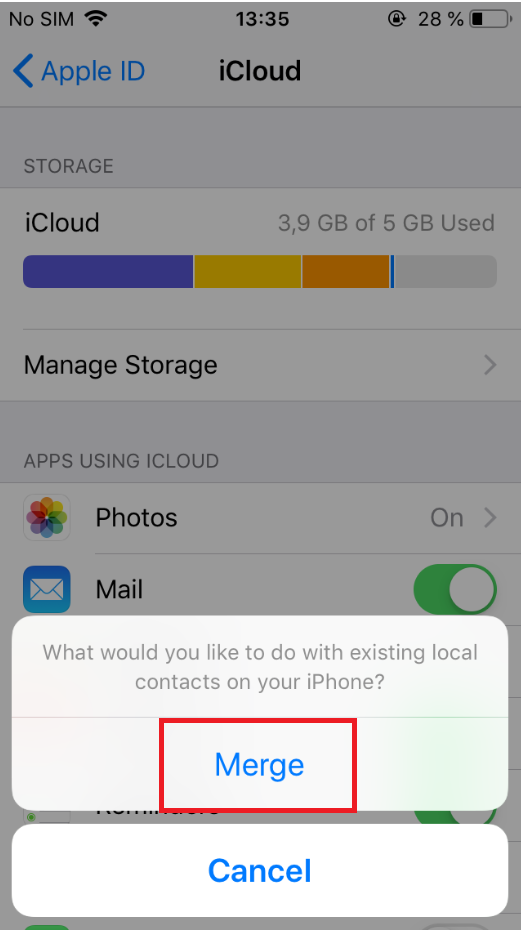
  • Accesam iCloud si ne asiguram ca optiunea Contacts este bifata (vom apasa butonul Merge dupa bifarea acesteia):

[mai mult...]