
Soluții

Cum se utilizează Spotify cu Siri pe iPhone

În sfârșit, Spotify funcționează cu Siri pe iPhone. Dacă utilizați iOS 13 sau o versiune ulterioară, puteți cere direct lui Siri să redați playlistul preferat, melodia sau artistul dvs. pe Spotify. Iată cum să o configurați. iOS 13 extinde suportul pentru terți pentru Siri. Și una dintre aplicațiile care profită de noua caracteristică este Spotify. Aceasta înseamnă că puteți obține controale de redare în stil Apple Music cu Siri pe iPhone. Acum există un motiv mai puțin pentru care să vă legați de Apple Music.

[mai mult...]

Hidden Windows 10 Features

Many of us have had Windows 10 on our PCs for a while now, so we’re pretty used to the new features of the operating system from daily use. But whether you’re using the PC you’ve had for years or upgraded to a new device that was Windows 10-ready out of the box, you might find it useful to learn some of the tricks that Microsoft has hidden underneath the hood.

[mai mult...]

How to Add the Developer Tab to the Microsoft Office Ribbon

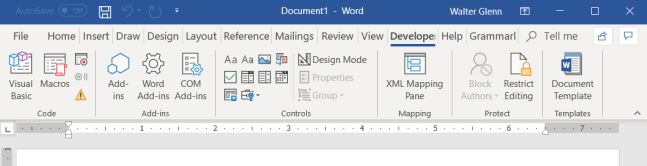
The Developer tab is not displayed on the Ribbon in Office apps by default, but it’s easy to add and gives you access to advanced features like macros, ActiveX controls, and form controls to Word, Excel, PowerPoint, and Visio. Here’s how to set it up.

When would you need the Developer tab? You can use the Developer tab to:

  • Write or run macros
  • Use XML commands
  • Use ActiveX controls
  • Create applications to use with Microsoft Office programs
  • Use form controls in Microsoft Excel
  • Work with the ShapeSheet in Microsoft Visio
  • Create new shapes and stencils in Microsoft Visio

Once you add the Developer tab to the Ribbon, it will remain visible unless you clear the check box or reinstall a Microsoft Office program.

[mai mult...]