Crearea unei noi politici de “Safe attachment”
Următorii pași descriu modul de a crea o nouă politică de atașare sigură (safe attachment).
[mai mult...]
Soluții pentru problemele tale IT

Următorii pași descriu modul de a crea o nouă politică de atașare sigură (safe attachment).
[mai mult...]Pentru a vă arăta toți pașii pe care trebuie să îi faceți, voi exporta “arborele” de directoare ale unui folder numit Data găsit în partiția mea F.
Acest ghid funcționează pe toate versiunile de Windows, inclusiv Windows 7, Windows 8.1 și Windows 10.
[mai mult...]Noile update-uri Microsoft pentru Windows și Office continuă să afecteze utilizatorul final, recent Office 2019 făcându-se cunoscut printr-o eroare a Excel ce împiedică deschiderea workbook-urilor de pe rețelele locale, file share-uri sau NAS.
[mai mult...]Meniul Start pe Windows a avut o călătorie lungă. De la o coloană clasică la ecran complet la Windows 8, Meniul Start a văzut toate dimensiunile. Cea mai neplăcută dimensiune dintre ele a fost meniul Start pe ecran complet. Din fericire, Microsoft l-a renovat și a introdus un hibrid de tradițional și Windows 8. Cu toate acestea, pentru unii utilizatori de Windows 10, meniul Start încă ocupă întregul ecran. Așa că vă vom spune cum să ieșiți din uriașul meniu Start în Windows 10.

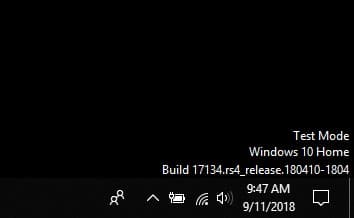
De multe ori Windows 10 începe brusc să afișeze filigranul mod Test pe Desktop. Un mesaj este afișat în colțul din dreapta jos al desktopului având următorul text:
Test Mode
Windows 10
Riscurile utilizării Tor în cadrul unei rețele – cum să blocați Tor în afacerea dvs. – blocarea programelor malware, utilizarea darknet și nodurile necinstite.
De când serviciul de anonimat The Onion Router (Tor) a început să fie utilizat în mainstream în urmă cu aproximativ cinci ani, administratorii întreprinderilor se întreabă dacă reprezintă un risc demn de blocare și, dacă se întâmplă, cum se poate realiza acest lucru.
Studiile de caz din Marea Britanie care examinează problema riscurilor sunt aproape inexistente și singurul sector care oferă multe dovezi anecdotice a fost în universitățile în care Tor a câștigat, în mod previzibil, un fel de urmărire sau un fel. Nu este greu de înțeles că Tor are o mulțime de utilizări perfect legitime (nu este intenția noastră de a stigmatiza utilizarea acestuia), dar are și multe probleme tulburătoare, cum ar fi conectarea la site-uri criminale de pe „darknet”, ca si canal pentru malware și ca mod de ocolire a securității rețelei. Anxietatea pentru organizații este că este imposibil de spus care este.
Tor nu este singura rețea de anonimat concepută cu ultra-securitate, The Invisible Internet Project (I2P) fiind un alt exemplu. În plus, VPN-urile și reprezentanții generali creează riscuri similare, deși acestea sunt mult mai ușor de localizat și de blocat.
Tor poate trăi în interiorul rețelelor, fie ca un browser care îmbină serviciile într-o bucată de software ușor de utilizat sau, mai grav, ca un nod de server sau o punte de rețea care devine părți ale rețelei sale. Deși utilizatorii rețelei pot configura unul sau ambii, este important să înțelegem că niciuna nu este o veste bună pentru o organizație din mai multe motive. O problemă conexă sunt site-urile web care nu doresc ca utilizatorii Tor să se conecteze anonim la orice serviciu oferit, deși aceasta este o problemă de specialitate.
Riscurile producerii de tor în întreprindere
Riscul 1 – „darknet”
Darknet-ul este mai mult decât hiperbole. O estimare Kaspersky Lab de la începutul anului 2014 a plasat numărul serviciilor infracționale care îl utilizează la aproape 1.000, aproape sigur o subestimare considerabilă. Indiferent de cifră, numărul care va fi crescut de câteva ori până acum. Darknet-ul ar exista fără Tor, desigur, ceea ce înseamnă pur și simplu o modalitate de a-l atinge fără a dezvălui adresa IP sau lista de navigare a clientului.
Riscul 2 – malware, botneți, DDoS
În plus, infractorii au început să folosească Tor ca canal de comunicații pentru controlul și controlul malware (C&C), ceea ce înseamnă că prezența sa poate indica infecție și compromis. Pentru majoritatea organizațiilor, aceasta va fi probabil cea mai mare îngrijorare dintre toate. Deși Tor C&C este mai lent, este un loc tentant pentru malware pentru a-și ascunde comunicațiile. Lățimea de bandă a unora dintre nodurile de ieșire a determinat ca Tor să fie deturnat pentru atacuri DDoS.
Riscul 3 – lista neagră
Presupunând că o organizație își propune să controleze utilizarea Tor, blocarea acestuia implică două elemente care acoperă traficul de intrare / ieșire, unde cineva a stabilit un nod Tor și traficul de ieșire, unde un computer client se conectează la un nod de intrare Tor. Majoritatea administratorilor se vor concentra pe aceștia din urmă, motivând că este cea mai probabilă problemă, dar este important să ne amintim că configurarea unui nod Tor într-o rețea nu este atât de greu de făcut. Aceasta este o durere de cap potențială majoră, deoarece riscă ca IP-ul unei organizații să fie adăugat la o listă de blocuri de internet.
[mai mult...]