Afisarea fotografiilor pe TV cu ajutorul Chromecast-ului
Dacă ai un Chromecast poți să îți afișezi fotografiile și videoclipurile pe un ecran mai mare.
[mai mult...]
Soluții pentru problemele tale IT

Dacă ai un Chromecast poți să îți afișezi fotografiile și videoclipurile pe un ecran mai mare.
[mai mult...]This is very simple way to remove or reset asus laptop bios password. To be honest personally only needed to reset bios password few times and was not matter of being forgotten just bought laptop with bios password installed and had to remove and every time had to spend hours to find site where to get the code to unlock bios.
There’s loads of sites where you can get the codes for reset but most of them have codes only for some rescue dates.. 2008-06-06 etc., that means you would have to set your windows date to date given and then enter to bios reset.
How to remove Asus laptop bios password easy way!

For all Acer laptops, the BIOS password and settings can be removed by taking off the battery on the motherboard for about three minutes.
However, after I researched multiple models of Acer laptops, I find that the location of the button battery on the motherboard is different depending on the model of the Acer laptop. What’s more, for different models of Acer laptops, the difficulties of unpacking the case and removing the battery are not the same. For example, for the following model of Acer laptop, the button battery on the motherboard can be taken off easily after opening the small cover.
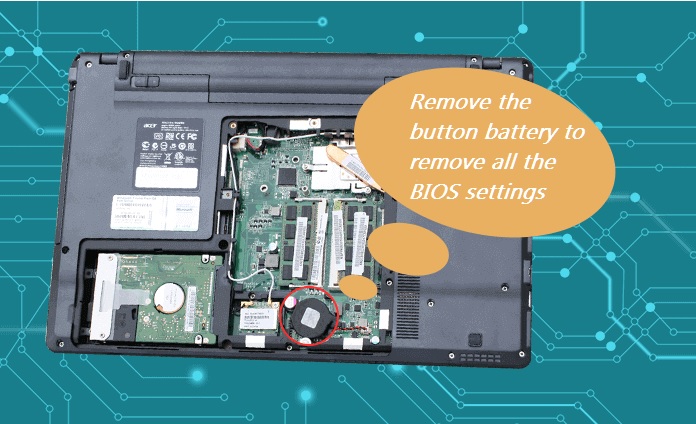
But for some models of Acer laptops like Acer Helios 500, to detach the button battery, the case needs to be unpacked firstly, which is hard to do and the detachment needs the help of the professional.
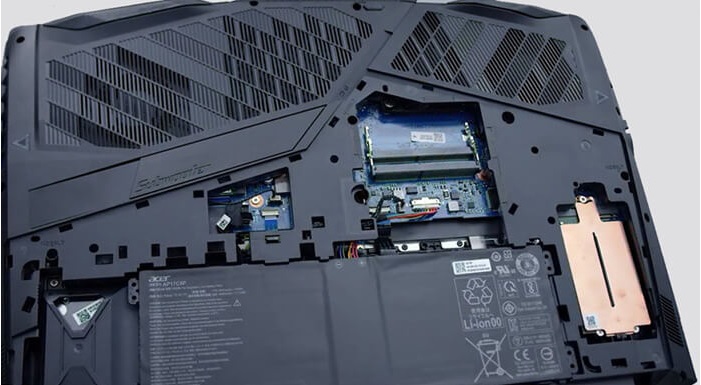
After unpacking the small back cover of the Acer Helios 500 laptop, we can’t see the button battery.
When the case is unpacked, we can find the button battery. However, it’s not easy to open the case and it’s not recommended to unpack it by ourselves, unless your hands-on ability is great.
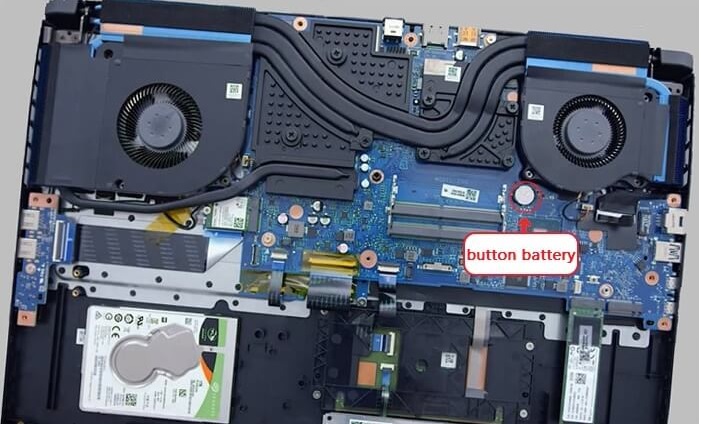
In either cases, you can unpack the small back cover firstly to see if there is the button battery. If there is not, you can take it to the repair center and ask the professional to deal with it.
[mai mult...]Setarea IP-ului manual pe Ubuntu Linux.
[mai mult...]Cum activam un port inchis pe un Switch Cisco
[mai mult...]Accesare Local users and groups prin consola
[mai mult...]