Cod eroare CE-35486-6 PS4
Sistemul nu poate citi discul. Este posibil ca formatul discului să nu fie suportat sau discul să fie corupt.
[mai mult...]
Soluții pentru problemele tale IT

Sistemul nu poate citi discul. Este posibil ca formatul discului să nu fie suportat sau discul să fie corupt.
[mai mult...]Cerințe de actualizare manuală

Sistemul de operare Chrome pune sistemul dvs. de operare într-un mod de economisire a energiei atunci când închideți capacul. Acest lucru poate fi dificil dacă conectați laptopul la un monitor extern. Iată cum să opriți Chromebookul să nu mai treaca pe modul sleep atunci când închideți capacul.
[mai mult...]
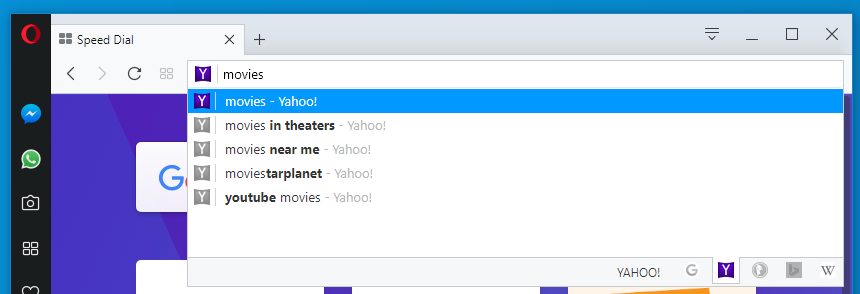
În Opera, puteți alege dintr-o varietate de motoare de căutare atunci când cautati pe Web cu bara de căutare si cea de adrese.
După ce instalați fie actualizările pentru Microsoft Office 2016 sau Office 2013, este posibil să întâmpinați situații neplăcute cu aplicația Skype for Business 2016, Lync 2013, Outlook 2016 sau Outlook 2013. Se restartează singure, nu răspund comenzilor, se blochează etc.
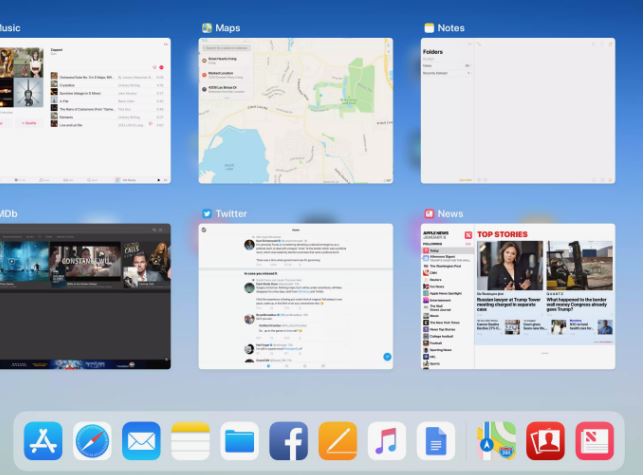
[mai mult...]While there are some very robust multitasking features available such as the iPad’s split-screen mode, we shouldn’t overlook the power of quickly switching between apps. The advantage of fast app switching is that each app gets the full screen.
The easiest way to toggle between two apps is to use the iPad’s dock. You can open the dock at any time by touching a fingertip to the very bottom edge of the screen and then sliding the finger toward the top of the screen, careful not to lift the finger from the screen until the dock and task manager screen is revealed. The three app icons on the far right of the dock will generally be the last three active apps, allowing you to quickly switch between them. You will also see small windows of your most recently used apps.
However, an even faster way of switching between apps is to use the multitasking gestures. These gestures use the tips of four fingers on the screen at the same time. You can quickly switch from one app to the next by sliding these four fingers from left-to-right to switch to the previous app or from right-to-left to switch to the formerly active app.