Soluții

Windows 10 cannot find Bluetooth headphones

Windows 10 has a lot of useful features including the ability to quickly connect devices to your PC without the need of cables around your desk using the Bluetooth technology. Bluetooth allows you to use a wide range of wireless devices, such as headphones, speakers, mice, keyboards, and many other. Out of all these gadgets, Bluetooth headphones are praised for their ability to deliver quality sound without cables so the headphones industry has really embraced this technology and has started producing it on a scale.

Everything is great about Bluetooth when it works but it is far from being perfect and sometimes you will come across connectivity problems. If this is the case and you Windows cannot find your Bluetooth headphones, there are a number of troubleshooting steps you can do.

[mai mult...]
How to Disable Notification Area and Action Center in Windows 10 by using GPO in Windows Server 2012

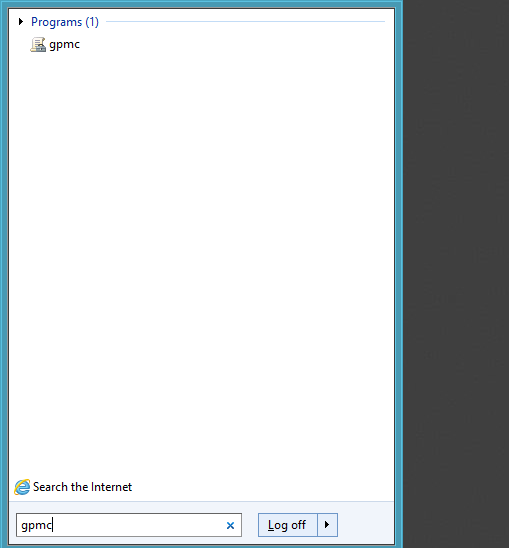
In order to disable notification area, press Windows-key and type gpmc .

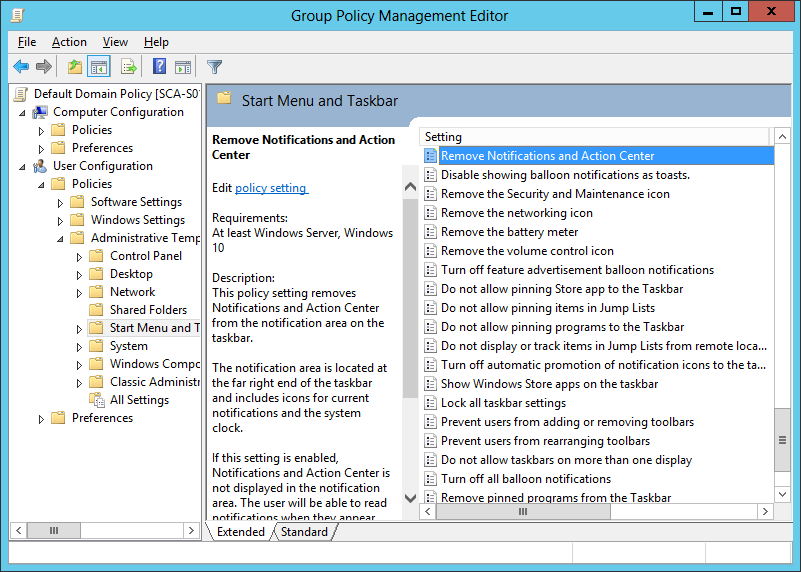
You can either use your default domain policy or create a new one.

After deciding which way you want to go, select on the left panel User Configuration, Administrative Template and Start Menu and Taskbar, and look for Remove Norification and Action Center, double click on it and check the Enable box.

[mai mult...]

How to change or Rename the Active Network Profile name in Windows 10

Windows 10 creează automat un profil de rețea atunci când vă conectați la o rețea. Rețelele Ethernet sunt numite “Network“, în timp ce rețelele fără fir sunt denumite după SSID-ul hotspot-ului. Dar le puteți redenumi cu o simplă setare de securitate a Registrului sau de politică de securitate locală.

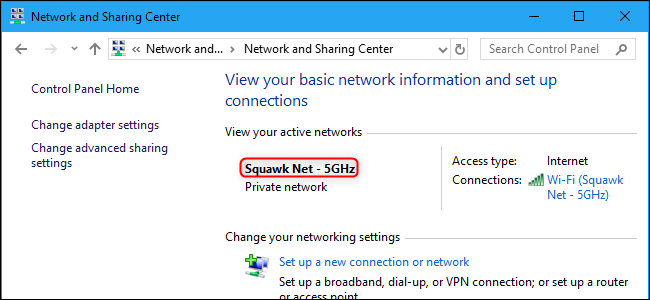
Numele apare sub „View your active networks” in Network and Sharing Center.

[mai mult...]