

A better way to use Alt+Tab in Windows 11
I’m one of those people who presses Alt+Tab hundreds of times a day to bounce between the many windows I have open. The problem is that Windows’ built-in switcher starts to get awkward when I have lots of windows open, and aside from choosing how many thumbnails to display, there’s not much room for customization.
Open windows are much easier to see
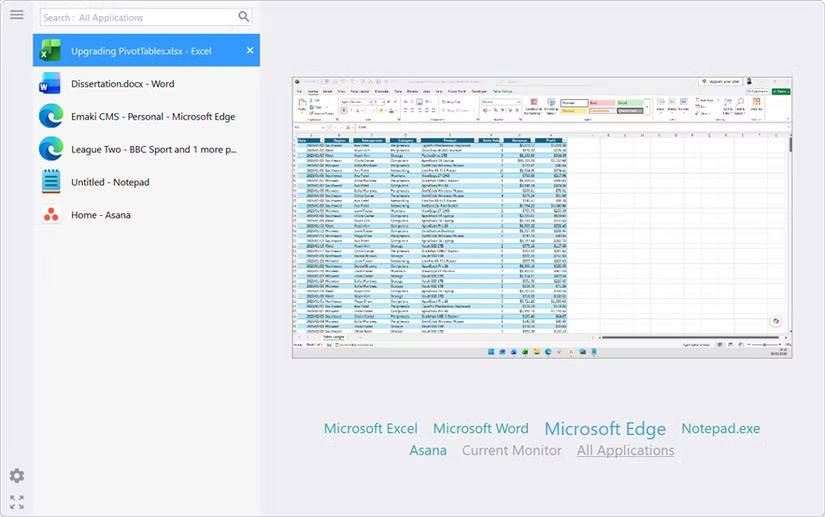
Windows 11’s Alt+Tab switcher is fine when I only have a few windows open. But once I’ve got a bunch of them running, those little thumbnails aren’t always much help. If I’ve got several Edge windows open, for example, I can end up staring at a row of tiny previews trying to work out which one I need. Alt-Tab Terminator takes a different approach. It puts my open windows into a vertical list on the left, with a much larger live preview on the right.
I can move through the list and actually see the contents of the selected window before I switch to it. One of the things I like most about Alt-Tab Terminator is the full-screen button in the bottom-left corner. After clicking it once, the switcher opens full-screen the next time I press Alt+Tab, giving me an even bigger view of everything. The preview also adjusts to fit the window, which is useful when I’m moving between my laptop screen and a larger monitor. And when the list gets long, I can scroll through it and wrap back around to the top when I reach the bottom.
[mai mult...]