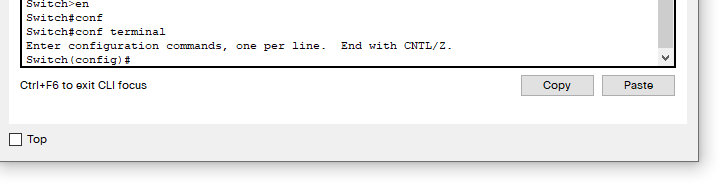
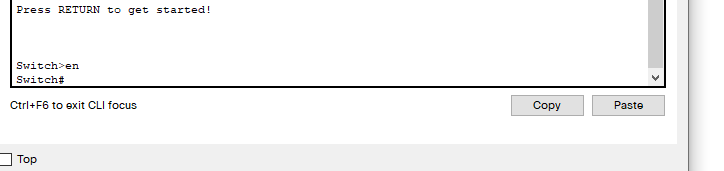
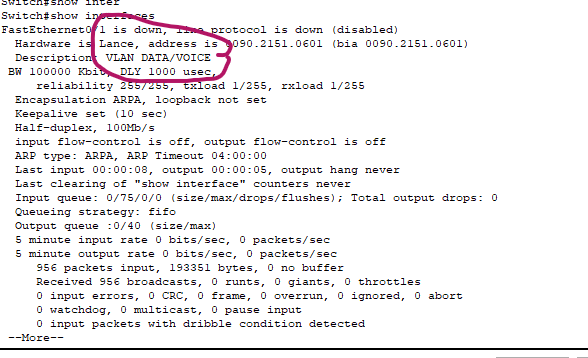
Configuring Switch Interface Descriptions on a Cisco Switch Data 07/12/2021 Autor razvan martes Categorie Soluții 2 741 Configurare noua (How To) SituatieMove to global configuration mode, like this: Move to interface configuration mode. In our example, let’s assign an a description to the Fa0/1 interface: To view the interface’s description, press Ctrl-Z to exit back to privileged mode then type: Solutie Tip solutiePermanent Voteaza Up Down (27 din 52 persoane apreciaza acest articol) ShareTweetShare Despre Autor razvan martes Solutii Asemanatoare How to boot Windows 11 in Safe Mode using Command Prompt 1 How to backup BitLocker recovery key on Windows 11 4 How to use Rufus to create a bootable media of Windows 11 that disables encryption 3 Cum schimbati limba pentru fereastra de optiuni/proprietati in RivaTurnerStatistics 1 Cum resetati complet setarile de retea pe Windows 11 Pro 1 Cum accesati optiunea “Add accessibility features” in browser-ul Brave 0 Leave A Comment? × Cancel Reply Save my name, email, and website in this browser for the next time I comment. nine × two =
Leave A Comment?