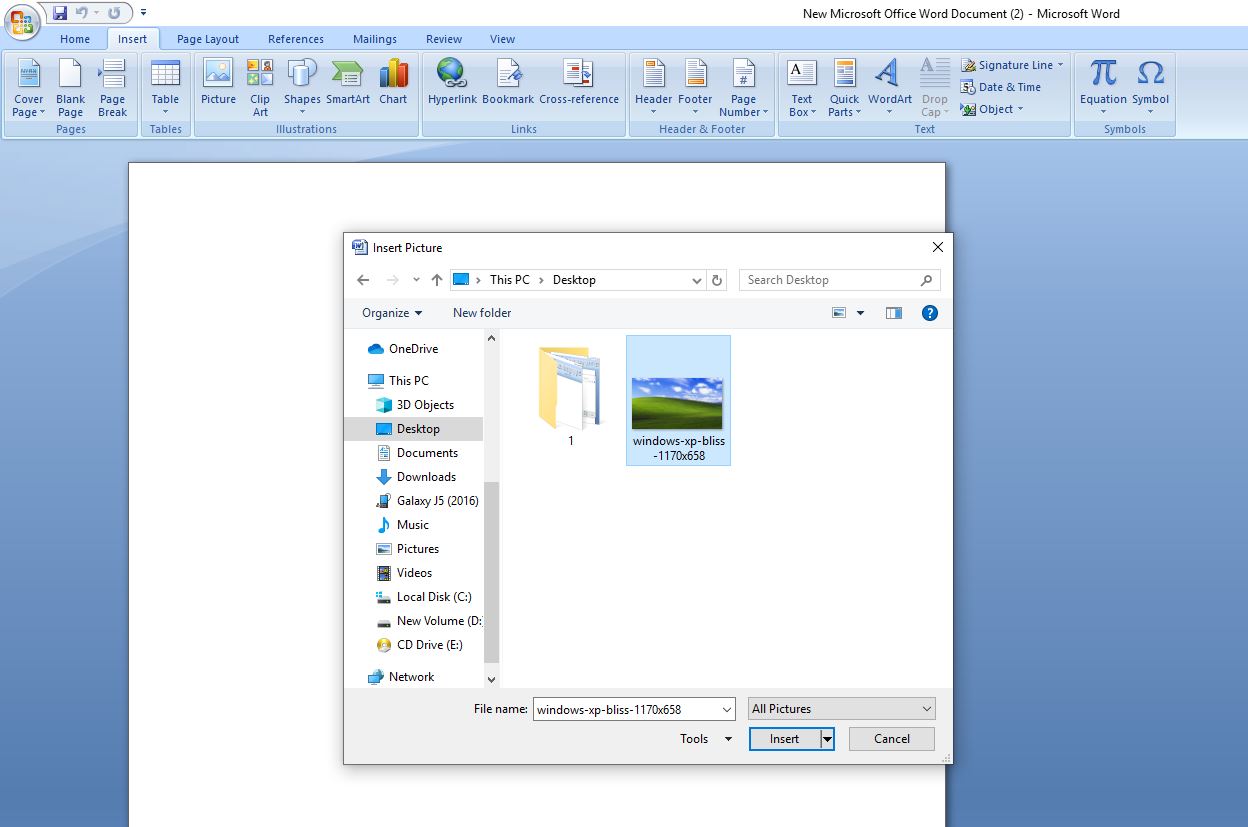
Cum inseram o imagine in Microsoft Word Data 03/02/2020 Autor Catalin Petrescu Categorie Soluții 6 996 Configurare noua (How To) SituatieCum inseram o imagine in Microsoft Word Solutie Deschidem un document in Microsoft Word Mergem pe tab-ul Insert Apoi selectam Picture Alegem locatia din PC Selectam imaginea dorita Si apoi dam Insert Tip solutiePermanent Voteaza Up Down (27 din 47 persoane apreciaza acest articol) ShareTweetShare Despre Autor Catalin Petrescu Solutii Asemanatoare Your Android phone’s battery has a limited lifespan -1 5 Samsung settings you should change on every new Galaxy -3 Your Android Status Bar is cluttered with Icons? -3 How to export your installed Apps and reinstall them on another PC with winget -1 How to set up SSH Key Authentication and disable Password Login on Linux 2 How to find which program is using a Port in Windows and stop it 0 Leave A Comment? × Cancel Reply Save my name, email, and website in this browser for the next time I comment. × four = 8
Leave A Comment?
