
Follow Us

Soluții pentru problemele tale IT

Home /Servicii de e-mail/Postfix/Stergere cont/Cum se sterge un cont de e-mail in Postfix
Home /Servicii de e-mail/Postfix/Cum se sterge un cont de e-mail in Postfix
Home /Servicii de e-mail /Cum se sterge un cont de e-mail in Postfix

Cum se sterge un cont de e-mail in Postfix

  • Data 11/02/2016
  • Autor Florin Ghe
  • Categorie Postfix, Servicii de e-mail, Stergere cont
  • 13
  • 4706
Configurare noua (How To)

Situatie

Atunci cand se doreste stergerea definitiva a unei adrese de mail.

Solutie

Pasi de urmat

Va logati folosind credentialele unui user ce are drepturi de administrator :

1

Selectati din meniu Virtual List -> Virtual List :

2

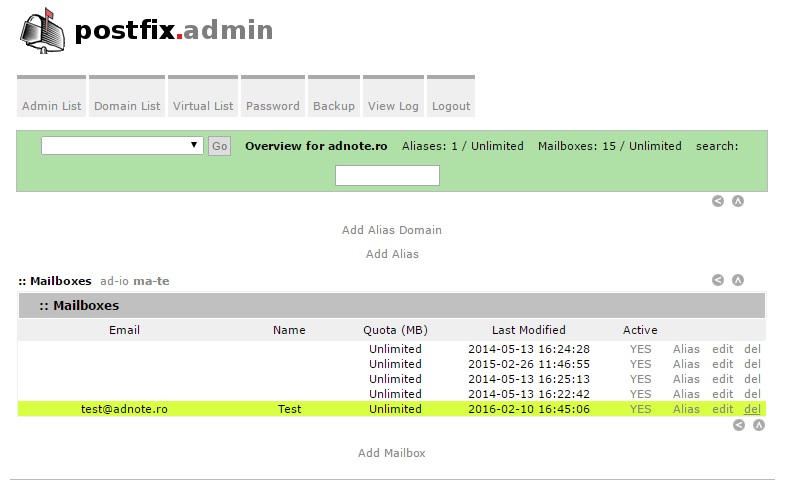
Mergeti la adresa de mail pe care doriti sa o stergeti, faceti click pe butonul del si apoi OK :
3

Tip solutie

Permanent

Voteaza

Up Down
(53 din 92 persoane apreciaza acest articol)
Share
Tweet
Share

Despre Autor

Florin Ghe

Solutii Asemanatoare

  • Cum se schimbă organizatorul întâlnirii în Outlook folosind metoda de administrare cu Powershell 2
  • Cum se setează mesajul Out Of Office Message in Outlook pentru un alt utilizator 6
  • Cheile de acces Microsoft Entra de pe Windows acceptă acum autentificarea rezistentă la phishing -5
  • Cum se exportă politicile de acces condiționat din Cloud în format CSV cu PowerShell 1
  • Microsoft a lansat versiunea Windows Server 2025 Security Baseline(v2506) 2
  • Cum rezolvăm alerta “SMTP Address Has No Mailbox Associated” 5

Leave A Comment? × Cancel Reply

32437

Soluții Disponibile

0 Articole

In ultima saptamana

Cele mai recente soluții

  • Your Android phone’s battery has a limited lifespan
    • 28
    • 3 days ago
  • 5 Samsung settings you should change on every new Galaxy
    • 31
    • 03/11/2026
  • Your Android Status Bar is cluttered with Icons?
    • 32
    • 03/11/2026
  • How to export your installed Apps and reinstall them on another PC with winget
    • 15
    • 4 days ago
  • How to set up SSH Key Authentication and disable Password Login on Linux
    • 12
    • 02/11/2026
© Askit.ro, 2014 - 2026. All rights reserved. Done by Class IT
Share
Tweet
Share