
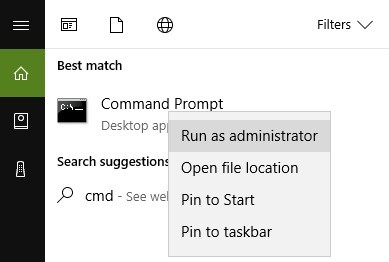
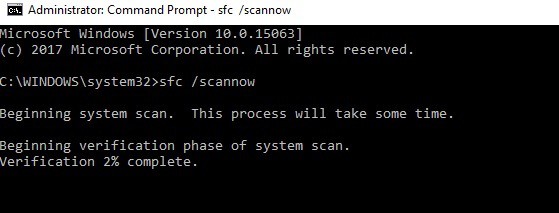
Eroare ERROR_FILE_NOT_FOUND Data 09/05/2019 Autor rasanu catalin Categorie Soluții -8 611 Configurare noua (How To) SituatieCand primeste eroarea ERROR_FILE_NOT_FOUND si vrei sa o rezolvi. Solutie Pasi de urmat Apsati pe ”Start”, scrieti ”cmd”, apasati click dreapta si apoi ”Run as administrator”. Scrieti comanda: ”sfc /scannow”: Asteptati sa se termine scanarea si reporniti calculatorul, apoi fisierele corupte vor fi inlocuite. Tip solutiePermanent Voteaza Up Down (21 din 49 persoane apreciaza acest articol) ShareTweetShare Despre Autor rasanu catalin Solutii Asemanatoare Shortcut close the current window of Google Chrome 0 Shortcut close the current tab in Google Chrome 0 Shortcut open a new tab and switch to it in Google Chrome 2 Shortcut open a new window in Google Chrome 0 How to use System Restore on Windows 10 and Windows 11 4 Cum se instalează Fail2ban pe Rocky Linux 10, 9 și 8? 2 Leave A Comment? × Cancel Reply Save my name, email, and website in this browser for the next time I comment. seven − two =
Leave A Comment?