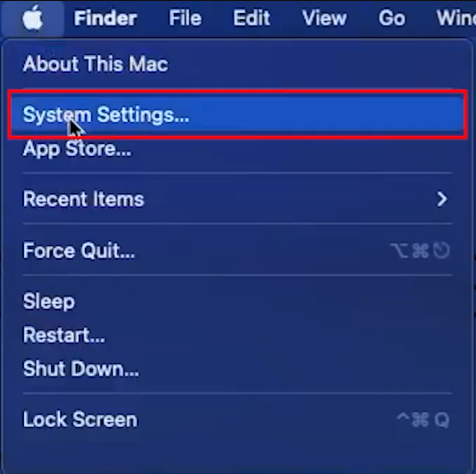
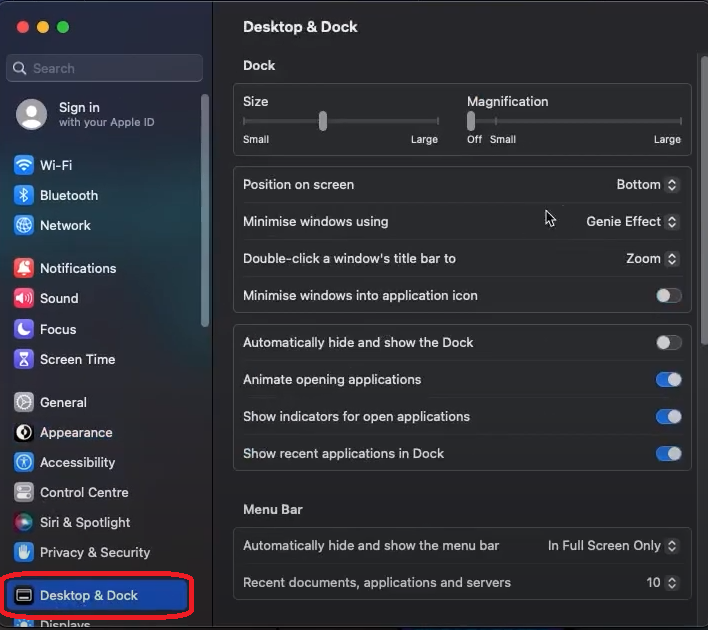
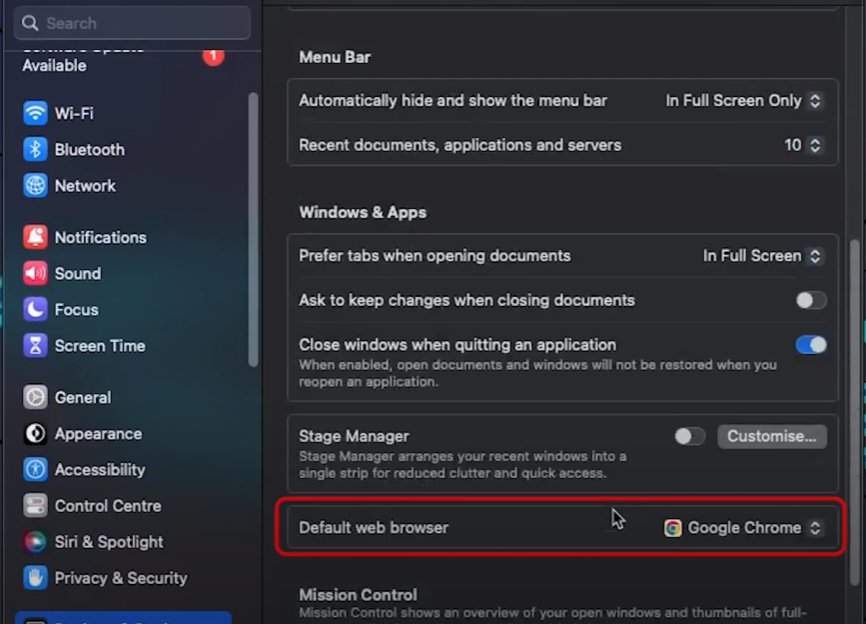
How to change the default web browser on MacOS Data 04/05/2023 Autor stefan cirstea Categorie Soluții -4 349 Configurare noua (How To) Situatie Solutie 1) Go to the Apple Menu and select System Settings 2) Go to Desktop & Dock 3) Scroll down and choose the browser you want from the Default web browser. Tip solutiePermanent Voteaza Up Down (18 din 40 persoane apreciaza acest articol) ShareTweetShare Despre Autor stefan cirstea Solutii Asemanatoare 5 apps that transforms your Plex -1 3 plugins to power-up your Vim statusline 0 Managementul performanței aplicațiilor 0 Cum stăpânești conversațiile cu Claude folosind prompturi în format XML 1 Cum lucrezi eficient cu Claude Code și ce prompturi îți aduc rezultate reale 1 Cum folosești Claude Design 1 Leave A Comment? × Cancel Reply Save my name, email, and website in this browser for the next time I comment. + one = seven
Leave A Comment?
