
Situatie
Many of us have old phones shoved away in a box somewhere, and there are plenty of great ways to repurpose them. If you’ve been interested in getting into the home media server craze, you may be hesitant to buy a bunch of new hardware.
Solutie
The short answer is a definitive yes, you can absolutely use an old Android phone or tablet as a media server. These devices are, after all, just small computers. However, there are several distinct limitations you should know about before diving in.
Your biggest hurdles will be the phone’s processing power and storage capacity. If your old phone is really old, it might struggle with transcoding. This is the process where the server converts a video file into a format the playback device (like your smart TV) can understand. If you’re streaming large 4K files or trying to stream to multiple devices at once, an old phone may struggle.
Storage is an equally big concern. Many old Android phones had only 128GB of storage—some still do! Even if your old phone has 256GB of storage, that can fill up pretty quickly. Thankfully, Android supports expandable storage, so this is an obstacle you can get around. More on that later.
But why?
As mentioned, there are many clever uses for old Android phones and tablets. These are sophisticated and powerful devices—it’s a shame to let them rot away. Running a media server on an old phone, however, is definitely stretching the limits of repurposing. So why bother?
First, you already own the hardware. Getting started is often the hardest part—it was for me when I set up my home music server. Using a device you already have eliminates the barrier of researching and purchasing a dedicated machine. Not to mention it’s a much cheaper way to get your feet wet.
Also, every home media server is different. Not everyone is interested in loading up a bunch of huge, high-quality video files. Maybe you just want a server for storing photos or being able to access documents from anywhere in your home. A minimal media server setup can save you from paying for a cloud storage subscription.
How to set up the Emby Media Server on an Android phone
One limitation I didn’t mention above is the media server software itself. While there are several great options available on other platforms, there’s essentially only one for Android: Emby. Plex has a media server for Android TV devices, but it can’t be installed on phones or tablets. Jellyfin and Kodi don’t have Android media servers at all. The good news is the Emby Media Server on Android is super easy to set up and use.
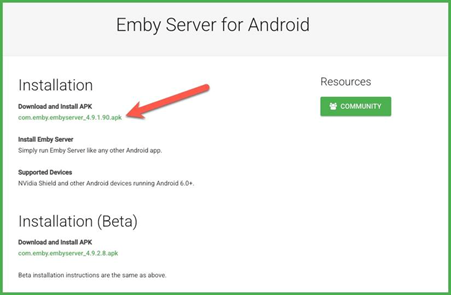
First, on the Android phone or tablet you want to use, go to the official Emby download page for the Android Server. Download and sideload the APK.
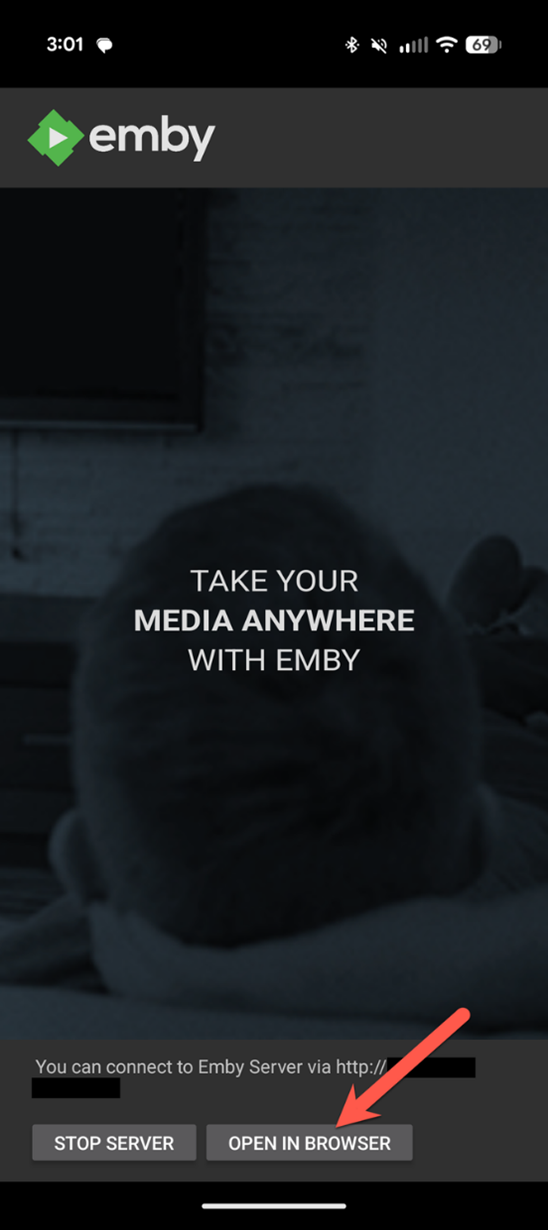
Open the newly installed Emby Server app on your device and tap the “Open in browser” button to get started. You’ll be guided through the process of creating a user profile and setting up your media library. This involves choosing a content type and pointing Emby at a folder to scan.
Once you’re finished with the server configuration, it’s just a matter of accessing it from other devices. You can do that with the Emby app (not the server app) on a wide variety of platforms, or through any browser. Simply enter the server’s local IP address and your login credentials. You can adjust the server settings by tapping the user icon in the top corner.
Accessories to make it better
To truly make your Android phone viable as a media server, a couple of accessories will improve the experience. As mentioned, your phone’s internal storage, even a generous one, probably isn’t enough for a sizable media library. The obvious solution is to simply connect a USB storage drive or a portable hard drive and point Emby at it.
However, since your phone only has a single USB port, you need a way to charge it and access the storage at the same time. Wireless charging would likely create too much heat long-term, so your best bet is some sort of dongle or hub that adds more ports.
The extra storage might not be needed for your situation, but power is a non-negotiable. Ideally, your old phone has a removable battery, and you can take it out and rely solely on AC power. Unfortunately, that’s increasingly rare even on old phones. Utilize the battery-protecting features on your phone and make sure it doesn’t get too hot.
So, an Android phone as a media server is surprisingly easy. Is it as good as a dedicated PC or a NAS? Of course not. But in certain situations, using what you already have is the best option.