
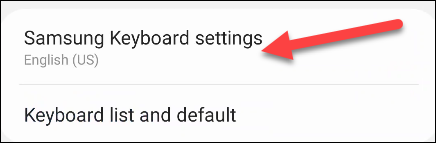
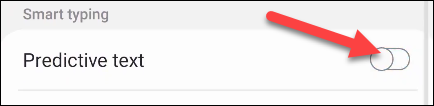
How to Turn off Autocorrect on a Samsung Galaxy Phone Data 07/05/2021 Autor duse dorin Categorie Mobile, Soluții -9 565 Configurare noua (How To) SituatiePlease follow the steps in order to disable autocorrect for the default Samsung Keyboard that comes on Galaxy smartphones. Solutie Pasi de urmat First, swipe down once from the top of your Samsung Galaxy device’s screen and tap the gear icon. Next, go to “General Management.” Select “Samsung Keyboard Settings.” Toggle off “Predictive Text.” Tip solutiePermanent Voteaza Up Down (16 din 41 persoane apreciaza acest articol) ShareTweetShare Despre Autor duse dorin Solutii Asemanatoare iOS 26: Switch back to the classic Phone App layout 4 How to enable Windows Recall -1 Arduino pulse rate monitor 1 Cum schimbati tipul de encryption din 128-bit in 40-or 56-bit pentru “File sharing connections” 2 Tailscale: The Easiest way to access your Homelab from Anywhere 1 Ai uitat parola de la Wi-Fi? O poti recupera in Command Prompt 0 Leave A Comment? × Cancel Reply Save my name, email, and website in this browser for the next time I comment. eight − eight =
Leave A Comment?