
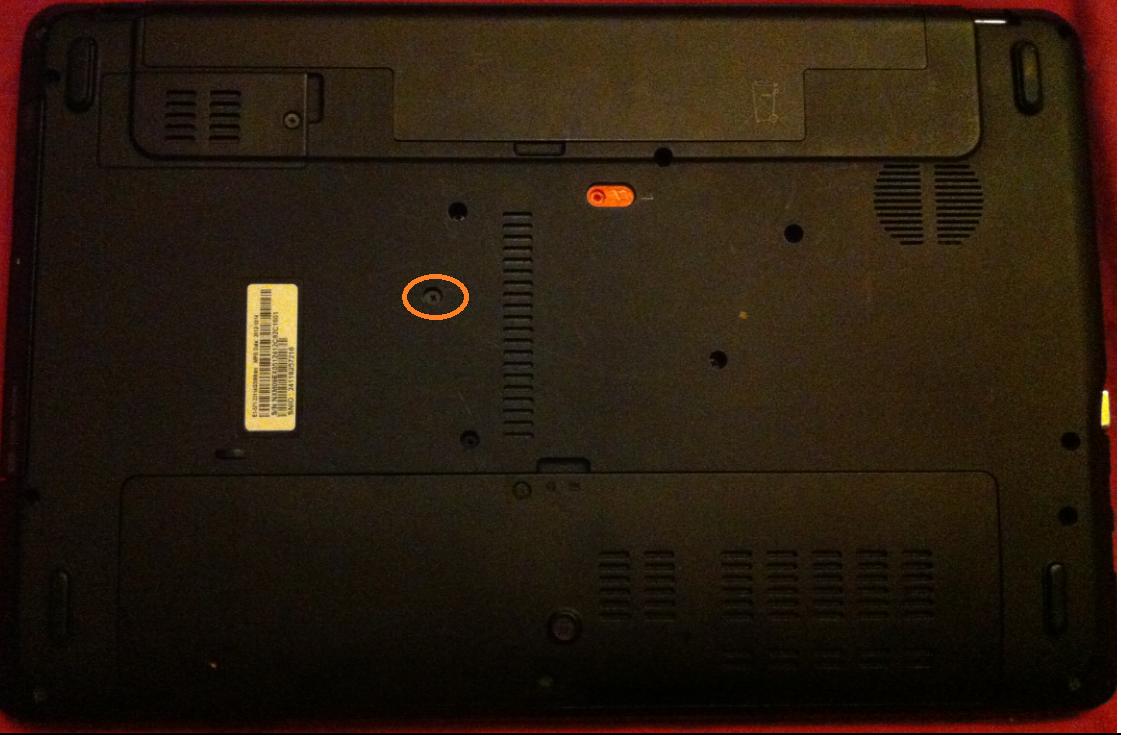
Înlocuire unitate optica la ACER Aspire E1-571 Data 28/08/2015 Autor Valentin Bozanchi Categorie Curatarea si verificarea componente hardware, Hardware, Stații de lucru -8 2036 Configurare noua (How To) SituatieUnitatea optica nu mai functioneaza sau trebuie data jos pentru a putea fi curatata la laptop ACER Aspire E1-571 Solutie Pasi de urmat Se desfac urmatoarele suruburi incercuite: –> tragem lateral unitatea optica –> si inlocuim cu o alta unitate optica Tip solutieWorkaround Voteaza Up Down (35 din 78 persoane apreciaza acest articol) ShareTweetShare Despre Autor Valentin Bozanchi Solutii Asemanatoare Your Android phone’s battery has a limited lifespan -1 5 Samsung settings you should change on every new Galaxy -1 Your Android Status Bar is cluttered with Icons? -3 Go to the bottom of the page in Google Chrome -1 Google Chrome – open a link, and jump to it 3 Shortcut switch to the previous tab in Google Chrome v2 -1 Leave A Comment? × Cancel Reply Save my name, email, and website in this browser for the next time I comment. nine − two =
Leave A Comment?