
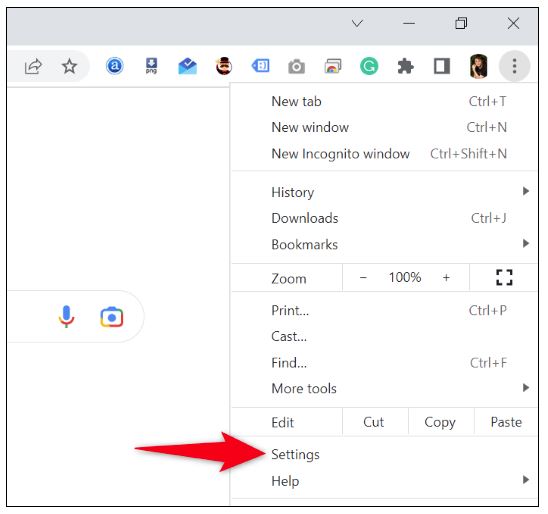
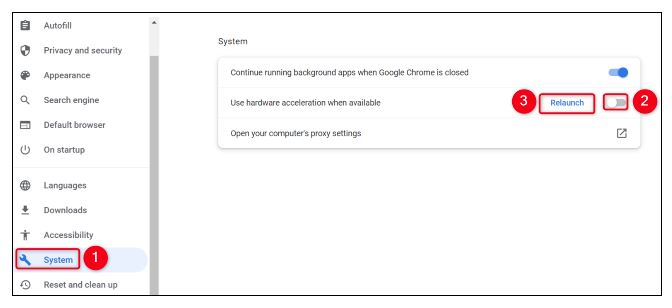
Turn Off Hardware Acceleration in Google Chrome Data 14/12/2022 Autor Ionel Georgian Preda Categorie Soluții 5 336 Configurare noua (How To) Situatie Solutie Pasi de urmat Launch Chrome, select the three dots in the top-right corner, and choose “Settings.” From the left sidebar, select “System.” On the right pane, turn off “Use Hardware Acceleration When Available.” Then, click “Relaunch”. Tip solutieWorkaround Etichetare: chromehardware acceleration Voteaza Up Down (18 din 31 persoane apreciaza acest articol) ShareTweetShare Despre Autor Ionel Georgian Preda Solutii Asemanatoare Cum schimbati tipul de encryption din 128-bit in 40-or 56-bit pentru “File sharing connections” 3 Ai uitat parola de la Wi-Fi? O poti recupera in Command Prompt 0 Cum iti creezi propriul buton de curățare a memoriei RAM 2 Activează „God Mode” în Windows: toate setările ascunse într-un singur folder 3 Extragerea textului dintr-o imagine 1 Accelerarea pornirii calculatorului 1 Leave A Comment? × Cancel Reply Save my name, email, and website in this browser for the next time I comment. − four = 4
Leave A Comment?