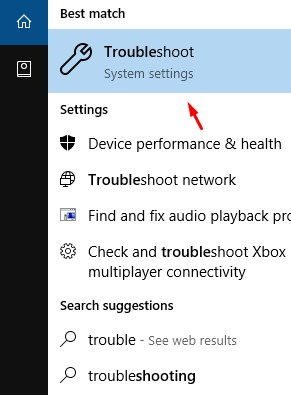
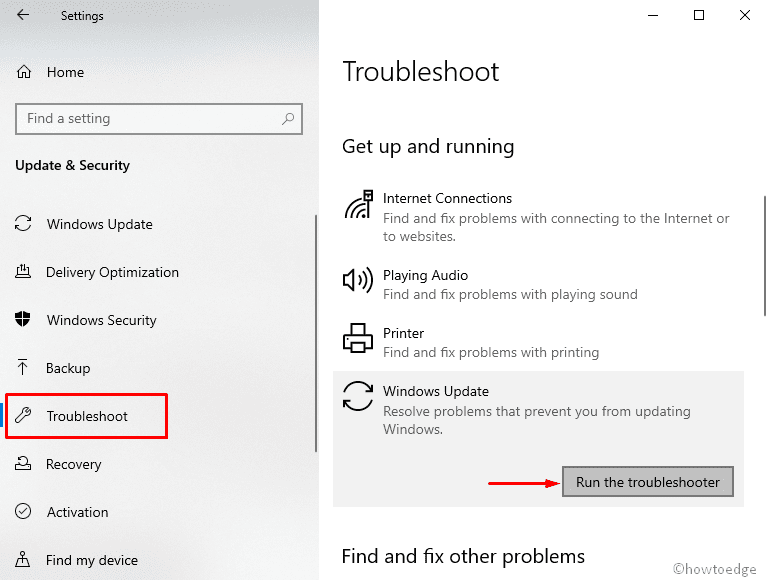
Windows Update Error 0xc1900104 Data 01/07/2020 Autor Tiberiu Gache Categorie OS - Windows -19 618 Rezolvare problema (Fix IT) SituatieWindows Update afiseaza eroarea 0xc1900104: Simptome Solutie Pasi de urmat Click pe Start si tastati Troubleshoot: Cautati Windows Update, dati click pe Run the troubleshooter: Efectuati Restart PC-ului. Tip solutiePermanent Etichetare: Windows Update Error 0xc1900104 Voteaza Up Down (9 din 37 persoane apreciaza acest articol) ShareTweetShare Despre Autor Tiberiu Gache Solutii Asemanatoare Bring your Windows Desktop to life with Wallpaper Engine 4 How to move Taskbar to top or side on Windows 11 1 How to fix high CPU usage in Firefox / Chrome -1 How to fix Hypervisor Error in Windows 10/11 by Checking Drive for File System Errors 4 How to fix Hypervisor Error in Windows 10/11 by restarting Hyper-V Services 1 How to fix Hypervisor Error in Windows 10/11 by running Windows Memory Diagnostic Tool 3 Leave A Comment? × Cancel Reply Save my name, email, and website in this browser for the next time I comment. 2 − = one

Leave A Comment?