
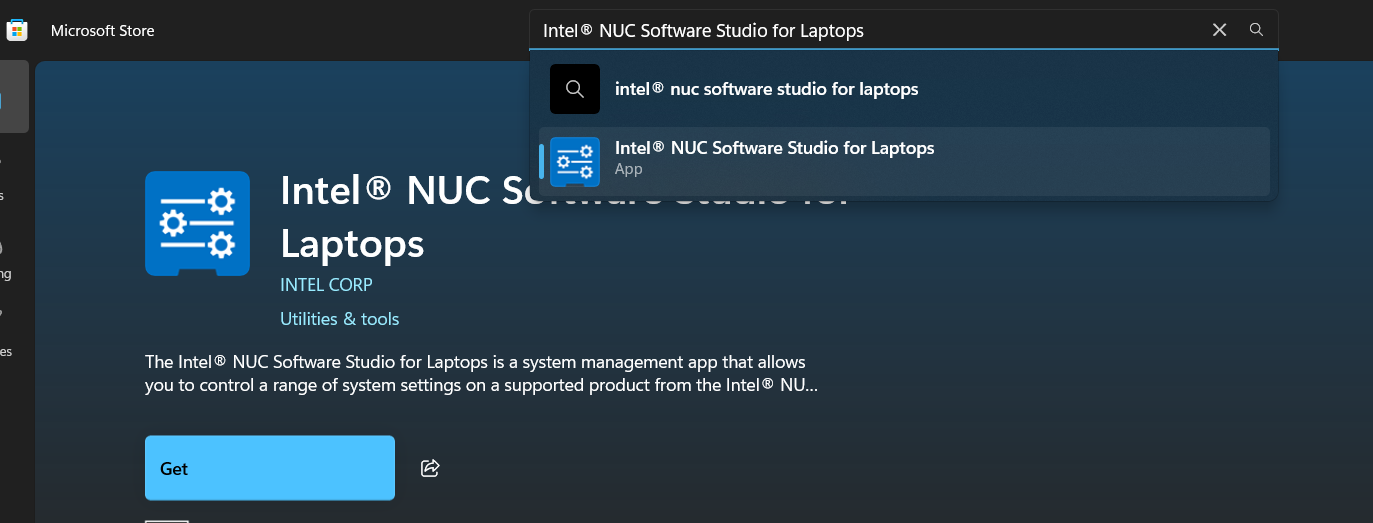
Cum instalăm Intel nuc software studio for laptops in Windows 10/11 Data 22/06/2026 Autor Florin Olariu Categorie Soluții 4 141 Configurare noua (How To) Situatie Solutie Navigăm în microsoft store din bara de jos sau de pe lupă, unde scriem store și va apărea microsoft store. Cautăm din bara de “search” aplicația Intel nuc software studio for laptops și dăm click ca în imagine. Apoi apăsăm “Get”, iar aplicația va începe să se instaleze. Aplicația va apărea în start menu de unde o putem deschide. Tip solutiePermanent Voteaza Up Down (16 din 28 persoane apreciaza acest articol) ShareTweetShare Despre Autor Florin Olariu Solutii Asemanatoare Windows 11’s new Cloud rebuild can resurrect PCs that won’t boot 0 Windows 11 26H2 Enablement Package (KB5121794) direct download for x64 and ARM64 1 Windows 11 – previzualizarea fișierelor PDF nu funcționează în File Explorer 11 How to reset a Googlebook to factory settings 6 Tint App Icons to match your New iPhone 18 Pro Color 0 How to verify Windows 11 ISO file authenticity using PowerShell 6 Leave A Comment? × Cancel Reply Save my name, email, and website in this browser for the next time I comment. 7 − 6 =
Leave A Comment?