
Follow Us

Soluții pentru problemele tale IT

Home /Windows Server/Active Directory/Setare expirare cont Active Directory
Home /Windows Server/Active Directory/Dezactivare cont Domain User/Setare expirare cont Active Directory
Home /Windows Server /Setare expirare cont Active Directory

Setare expirare cont Active Directory

  • Data 10/05/2016
  • Autor Radu P
  • Categorie Active Directory, Dezactivare cont Domain User, Windows Server
  • -11
  • 1703
Configurare noua (How To)

Situatie

Se doreste ca un cont de AD sa nu mai poata fi folosit dupa o anumita data

Solutie

Pasi de urmat

Se deschide Active Directory

Se navigheaza la OU-ul unde este user-ul respectiv, click dreapta – Properties
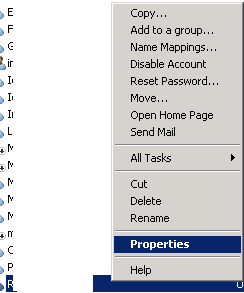
ad-user-properties

Se navigheaza la Account iar in partea de jos se bifeaza end of si se seteaza data
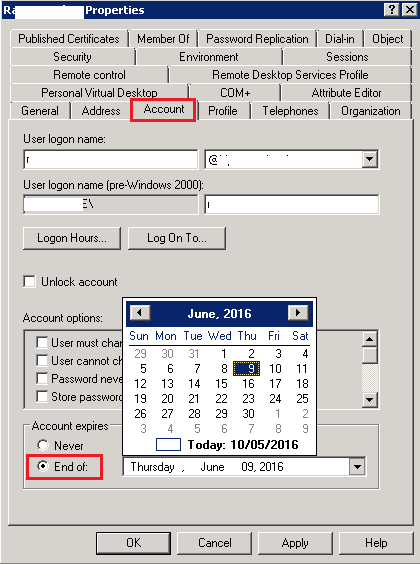
account-end-of

Tip solutie

Permanent

Voteaza

Up Down
(30 din 71 persoane apreciaza acest articol)
Share
Tweet
Share

Despre Autor

Radu P

Solutii Asemanatoare

  • Reparare eroare:”Trust Relationship Failed” fără scoatere din domeniu și fără restart (PowerShell) 3
  • Cum se adaugă servere în Cacti -1
  • Notificări personalizate in whatsapp pentru Android -2
  • Ce este folderul AppData în Windows și cum se poate curăța -10
  • Cum verificați dacă un fișier există cu Test-Path în PowerShell 3
  • Cum se configureaza politicile de autentificare biometrica in Active Directory utilizand GPO -16

Leave A Comment? × Cancel Reply

30790

Soluții Disponibile

0 Articole

In ultima saptamana

Cele mai recente soluții

  • How to resolve a Windows Update Install Error – 0x80070002
    • 85
    • 1 week ago
  • Bring your Windows Desktop to life with Wallpaper Engine
    • 65
    • 1 week ago
  • How to move Taskbar to top or side on Windows 11
    • 94
    • 17/12/2025
  • Reparare eroare:”Trust Relationship Failed” fără scoatere din domeniu și fără restart (PowerShell)
    • 72
    • 1 week ago
  • You’ve been deleting files the wrong way in Windows
    • 70
    • 1 week ago
© Askit.ro, 2014 - 2025. All rights reserved. Done by Class IT
Share
Tweet
Share