
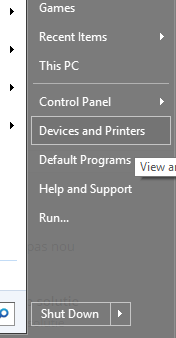
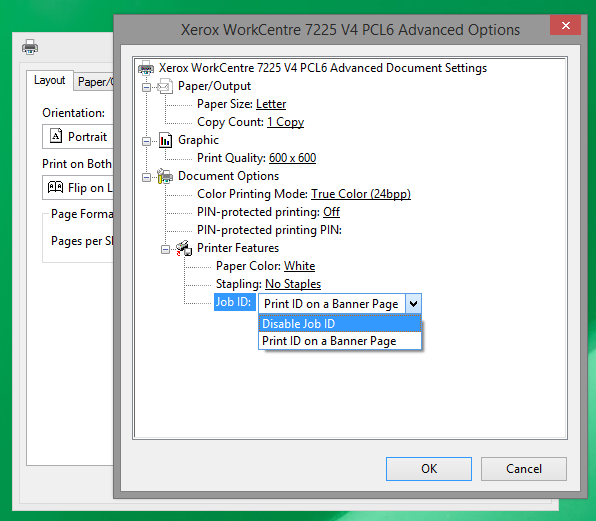
Cum dezactivezi Print ID-ul pentru o imprimanta Xerox Data 10/05/2016 Autor Adrian Tu. Categorie Stații de lucru -6 1090 Configurare noua (How To) SituatieAi o imprimanta Xerox si de fiecare data cand printezi la ea iti imprima si o pagina cu ID-ul statiei de lucru si numele utilizatorului. Solutie Pasi de urmat Pentru a dezactiva PrintID-ul trebuie sa deschizi Devices & Printers. Selectezi imprimanta dorita, apoi click dreapta -> Printing Preferences Alegem Advanced din meniul ce va aparea. La JobID alegem Disable Job ID si OK. Tip solutiePermanent Voteaza Up Down (12 din 30 persoane apreciaza acest articol) ShareTweetShare Despre Autor Adrian Tu. Solutii Asemanatoare Cum salvam ordinea pictogramelor de pe desktop 1 PikaOS install guide -1 How to install and configure MX Linux 4 How to fix Windows Update Error 0x800f0922 on Windows 11 via System Repair Commands 0 How to fix Windows Update Error 0x800f0922 on Windows 11 via Registry Editor Settings 0 How to fix Windows Update Error 0x800f0922 on Windows 11 via Windows Firewall Settings 3 Leave A Comment? × Cancel Reply Save my name, email, and website in this browser for the next time I comment. four × 4 =
Leave A Comment?