
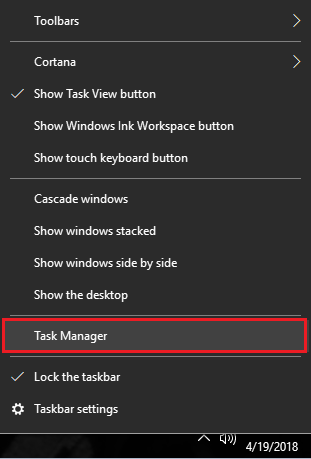
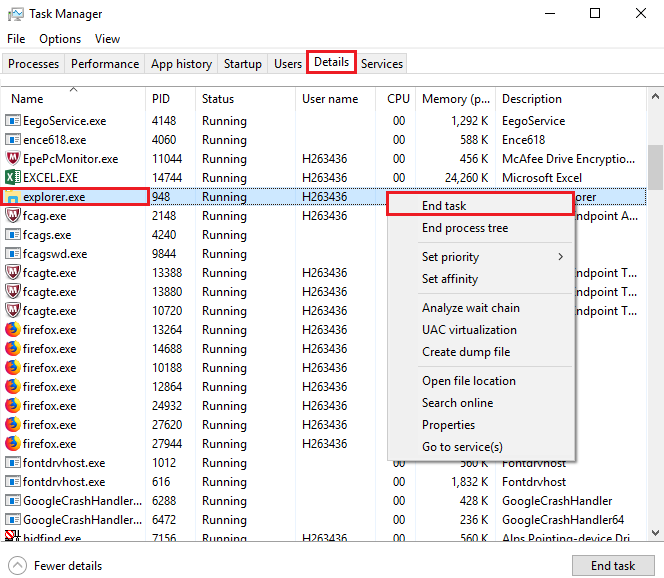
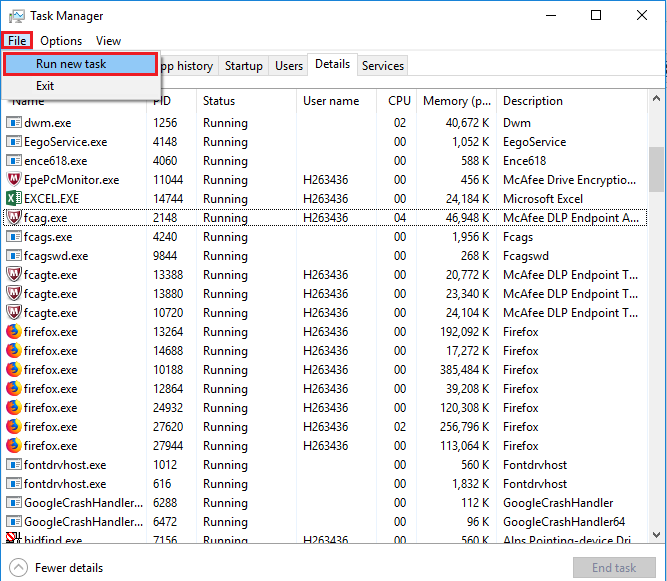
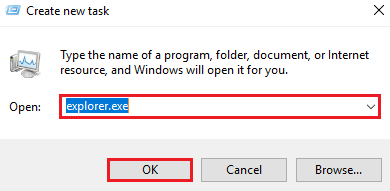
Icoane invizibile in Windows 10 – solutie noua Data 22/07/2018 Autor Gherghe Robert Petre Categorie OS - Windows, Stații de lucru -3 620 Configurare noua (How To) SituatieUneori in windows 10 iconitele pot aparea ca si imagini goale, iar proprietatile lor nu pot fi accesate. Solutie Puteti urmari pasii de mai jos pentru o rezolvarea rapida: Deschide task manager (CTRL+ALT+DEL sau click dreapta pe bara de start) In sectiunea Details, click dreapta pe explorer.exe si apoi pe End Task Apoi mergeti pe File si click pe Run New Task Introduceti “explorer.exe” si click ok: . Tip solutiePermanent Voteaza Up Down (17 din 37 persoane apreciaza acest articol) ShareTweetShare Despre Autor Gherghe Robert Petre Solutii Asemanatoare Cum oprim monitorul doar cu un simplu click 2 How to enable or Disable Font Smoothing in Windows 11 1 How to fix 0x800f0983 error on Windows 10/11 2 How to enable Windows 11 24H2 updates in WSUS 3 How to enable Windows 11 24H2 updates in SCCM 5 7 of the least-known Excel charts and why you should use them -1 Leave A Comment? × Cancel Reply Save my name, email, and website in this browser for the next time I comment. × one = five
Leave A Comment?