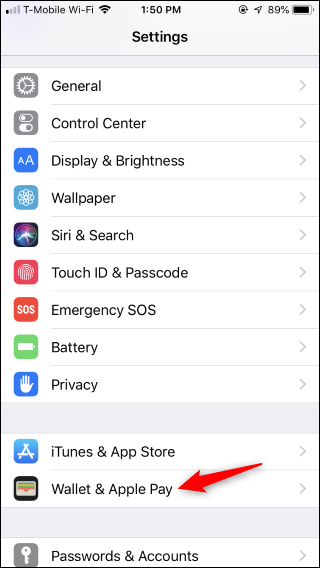
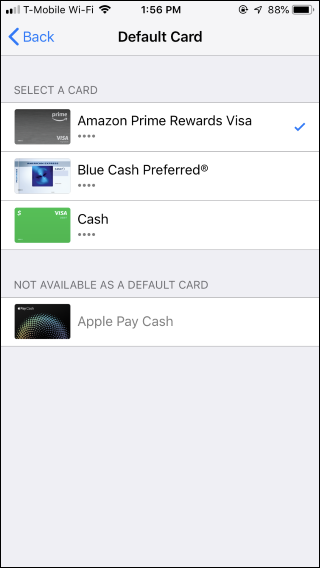
How to Change Your Default Card in Apple Pay on iPhone Data 15/10/2018 Autor stefan honciuc Categorie Mobile 4 937 Configurare noua (How To) SituatieSchimbare card in ApplePay. Solutie Pasi de urmat Pentru a schimba cardul pe un iphone du-te in Settings > Wallet & Pay Cauta Default Card Selecteaza cardul dorit ca Default Tip solutiePermanent Voteaza Up Down (26 din 48 persoane apreciaza acest articol) ShareTweetShare Despre Autor stefan honciuc Solutii Asemanatoare Here’s the right way to use Microsoft Word on your phone 6 How to extract audio from a video file on iPhone 9 Cum activezi si folosesti functia Fixare Aplicatie pe telefoanele Samsung 5 Transferul datelor de orice tip catre dispozitive cu iOS/iPadOS folosind wi-fi + VLC 3 Imposibilitate alimentare electrica terminal Apple cu conector Lightning / disfunctionalitati conector -1 Cum partajam configurarile de Accesibilitate pe toate dispozitivele Apple 1 Leave A Comment? × Cancel Reply Save my name, email, and website in this browser for the next time I comment. − four = 5
Leave A Comment?
