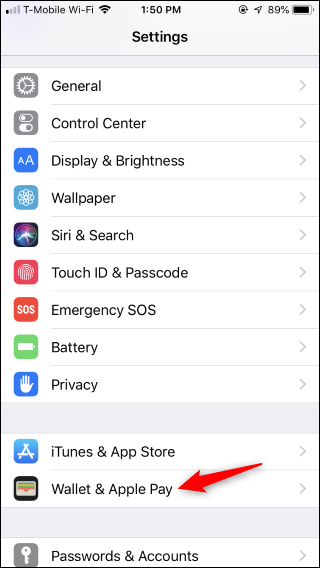
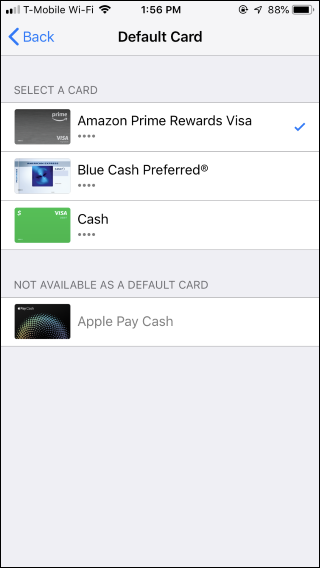
How to Change Your Default Card in Apple Pay on iPhone Data 15/10/2018 Autor stefan honciuc Categorie Mobile 7 1004 Configurare noua (How To) SituatieSchimbare card in ApplePay. Solutie Pasi de urmat Pentru a schimba cardul pe un iphone du-te in Settings > Wallet & Pay Cauta Default Card Selecteaza cardul dorit ca Default Tip solutiePermanent Voteaza Up Down (31 din 55 persoane apreciaza acest articol) ShareTweetShare Despre Autor stefan honciuc Solutii Asemanatoare Changing these 3 settings instantly makes your Android phone more private 4 Spyware-ul pe înțelesul tuturor: cum îl eviți? 1 Samsung S25 Ultra – overview 0 Ce este NFC si cum functioneaza platile contactless cu ajutorul sau? 0 Limitari ale transferului de date direct intre terminale iOS/iPadOS (2026) (EU) 6 Cum ne conectam de pe Mac pe Windows cu Jump Desktop? -2 Leave A Comment? × Cancel Reply Save my name, email, and website in this browser for the next time I comment. 1 × = five
Leave A Comment?
