
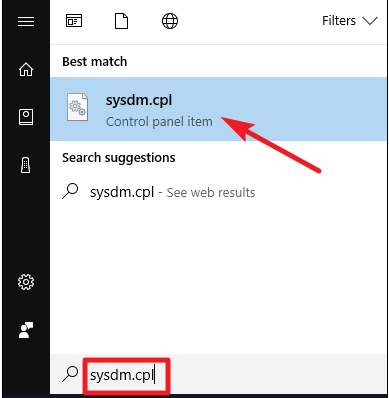
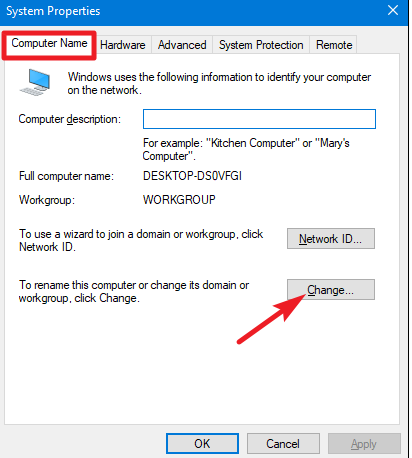
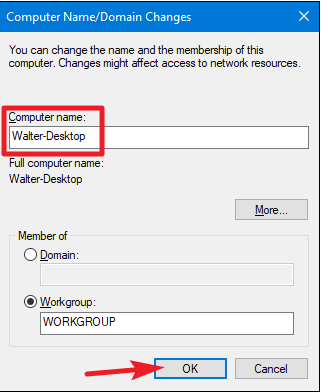
Cum poti reseta parola PC-ului personal Data 10/12/2018 Autor Razvan Bur Categorie OS - Windows -8 816 Configurare noua (How To) SituatieAtunci cand vrei sa schimbi denumirea PC-ului personal, poti folosi urmatoarea procedura. Solutie Pasi de urmat In start este necesar sa cauti sysdm.cpl Dupa care in fereastra de Computer Name, apsati pe butonul Change: Dupa care, in casuta nou aparuta in campul Computer Name poti trece orice altceva: Tip solutiePermanent Voteaza Up Down (15 din 38 persoane apreciaza acest articol) ShareTweetShare Despre Autor Razvan Bur Solutii Asemanatoare Bring your Windows Desktop to life with Wallpaper Engine 5 How to move Taskbar to top or side on Windows 11 1 How to fix high CPU usage in Firefox / Chrome 1 How to fix Hypervisor Error in Windows 10/11 by Checking Drive for File System Errors 4 How to fix Hypervisor Error in Windows 10/11 by restarting Hyper-V Services 1 How to fix Hypervisor Error in Windows 10/11 by running Windows Memory Diagnostic Tool 2 Leave A Comment? × Cancel Reply Save my name, email, and website in this browser for the next time I comment. 6 − one =
Leave A Comment?