
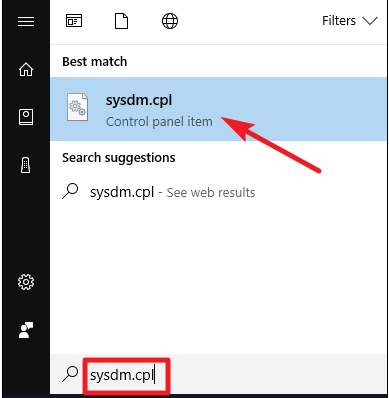
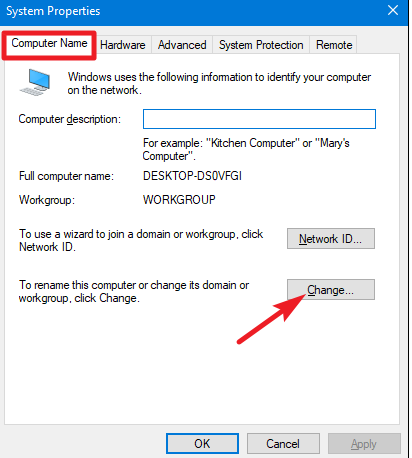
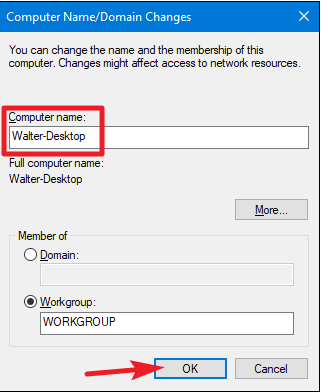
Cum poti reseta parola PC-ului personal Data 10/12/2018 Autor Razvan Bur Categorie OS - Windows -4 943 Configurare noua (How To) SituatieAtunci cand vrei sa schimbi denumirea PC-ului personal, poti folosi urmatoarea procedura. Solutie Pasi de urmat In start este necesar sa cauti sysdm.cpl Dupa care in fereastra de Computer Name, apsati pe butonul Change: Dupa care, in casuta nou aparuta in campul Computer Name poti trece orice altceva: Tip solutiePermanent Voteaza Up Down (28 din 60 persoane apreciaza acest articol) ShareTweetShare Despre Autor Razvan Bur Solutii Asemanatoare Framework Laptop — A new approach to personal computing -2 How to find BitLocker recovery key on Windows 11 -3 Error when downloading large Files from a WebDAV-Mapped SharePoint Library 4 How to manually Install Windows Updates using the Microsoft Update Catalog 2 Updating HP LaserJet Pro 400MFP M425dn Printer Firmware to troubleshoot Scan to Email issues 1 Notificările Snipping Tool nu se afișează în Windows 11 0 Leave A Comment? × Cancel Reply Save my name, email, and website in this browser for the next time I comment. − 3 = five
Leave A Comment?