Situatie
Cum puteti dezactiva screen saver-ul in macOS.
Solutie
Pasi de urmat
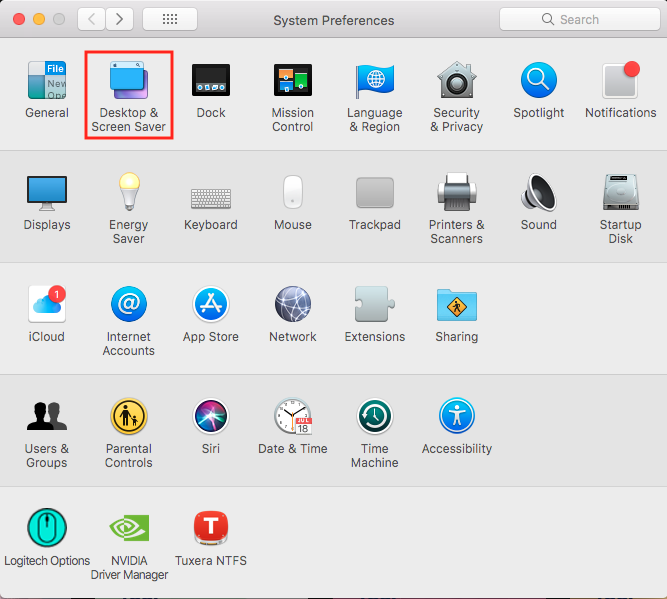
Deschideti “System Preferences”:

Intrati in “Desktop & Screen Saver“:
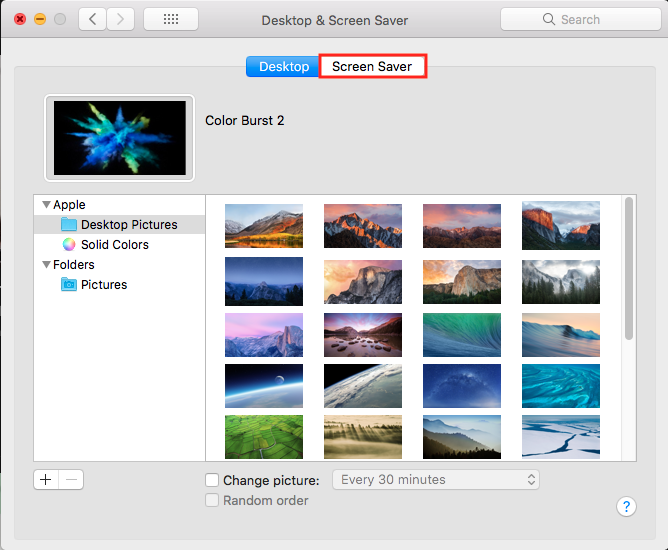
Click pe “Screen Saver”
In meniul din stanga jos “Start after” si selectati “Never“:


Soluții pentru problemele tale IT
Cum puteti dezactiva screen saver-ul in macOS.
Deschideti “System Preferences”:
Intrati in “Desktop & Screen Saver“:
Click pe “Screen Saver”
In meniul din stanga jos “Start after” si selectati “Never“: