Eroare la activare Recycle Bin in Active Directory
Atunci cand incercam sa activam Recycle Bin din Active Directory Administrative Center primim eroarea “A referral was returned from the server”.
[mai mult...]
Soluții pentru problemele tale IT

Atunci cand incercam sa activam Recycle Bin din Active Directory Administrative Center primim eroarea “A referral was returned from the server”.
[mai mult...]
Instalam Network Agent Kaspersky si descoperim eroarea din imaginea de mai jos.
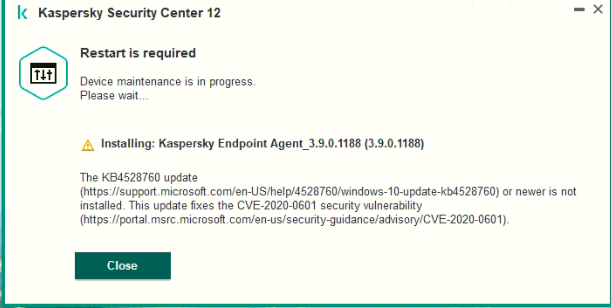
Eroarea aceasta apare cand nu avem un update de windows instalat, si mai exact, update-ul KB4528760.
[mai mult...]When the computer is in domain and we want to print something but it won’t start, we need to do the next troubleshoot:
[mai mult...]With a Windows PC geared for VPN use, you need to share your connection with your Xbox console. After linking your PC and Xbox over an Ethernet cable, follow the below steps to share your existing PC VPN.


To use your VPN on Xbox, your Windows PC must remain running with an active VPN connection.
[mai mult...]