

Soluții
Transpunerea (rotirea) datelor din randuri in coloane sau vice versa – Excel
Dacă aveti o foaie de lucru cu date in coloane pe care trebuie sa o rotiti pentru a o rearanja in randuri, utilizati optiunea “Transpose”. Cu acesta, puteti comuta rapid datele de la coloane la randuri sau invers.
[mai mult...]Cum sa lucrati cu mai multi utilizatori intr-un document de date Excel 2016?
Multi oameni si companii folosesc foi de date Microsoft Excel pentru a stoca date. De foarte multe ori mai multi colegi lucreaza in acelesi document, iar cea mai intalnita situatie este atunci cand doar un singur utilizator are permisiunile de scriere pe documentul specific.

How to Uninstall Windows 10’s October 2020 Update
As usual, Microsoft is slowly rolling out Windows 10’s October 2020 Update (20H2) to check for bugs. If your PC experiences a problem after installing the update, here’s how to roll back to your previous version of Windows 10.
You Only Have 10 Days!
Windows 10 only gives you ten days to uninstall big updates like the October 2020 Update. It does this by keeping the operating system files from the previous version of Windows 10 around. When you uninstall the update, Windows 10 will go back to whatever your previous system was running. This will probably be the May 2020 Update.
These old operating system files take up gigabytes of space. So, after ten days, Windows will automatically remove them. This saves disk space but prevents you from rolling back without reinstalling Windows 10 from scratch.
[mai mult...]Cum activam two step verification pe Gmail
Dorim sa activam two step verification pe contul nostru Gmail. Pentru a realiza acest lucru urmam pasii de mai jos:
[mai mult...]Cum dezactivati notificarile Screen Time pe MAC
Daca doriti sa utilizati in cotinuare Screen Time, dar sa nu mai primiti notificari, iata ce trebuie sa faceti pentru a le dezactivata.
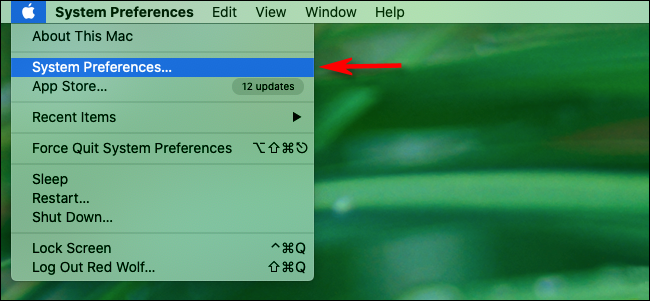
- Mai intai faceti click pe sigla Apple din coltul din stanga sus al ecranului si selectati “System Preferences”
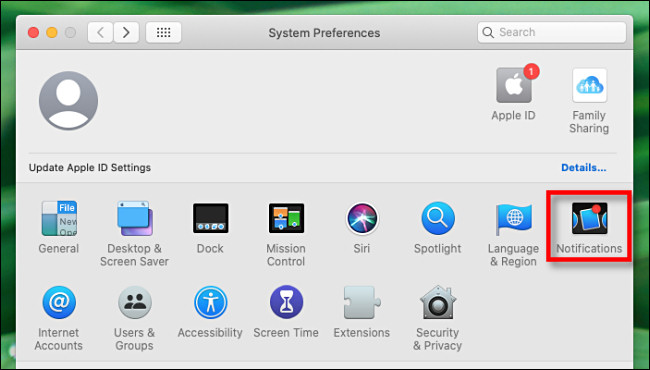
- In System Preferences, faceti click pe “Notifications”
- In Notifications preferences, derulati de scroll in jos pana gasiti “Screen Time” si faceti click pe acesta. Apoi faceti click pe comutatorul de langa ,,Allow Notifications From Screen Time” pana cand este oprit.

Inchideti “System Preferences” si incepand de acum nu veti mai primi notificari de la Screen Time.
[mai mult...]