Delete DNS Resource Records
You can use this topic to delete one or more DNS resource records by using the IPAM client console. Membership in Administrators, or equivalent, is the minimum required to perform this procedure.
[mai mult...]
Soluții pentru problemele tale IT

You can use this topic to delete one or more DNS resource records by using the IPAM client console. Membership in Administrators, or equivalent, is the minimum required to perform this procedure.
[mai mult...]Google plans to migrate installations of the company’s Chrome web browser on Android from 32-bit to 64-bit in the near future. While the migration is limited to devices running Android 10 or newer, it should have a positive effect on the performance of the browser and security. Chrome users on Android may wonder whether their version of the web browser is a 32-bit or a 64-bit application to find out whether their version of Chrome has been migrated already.
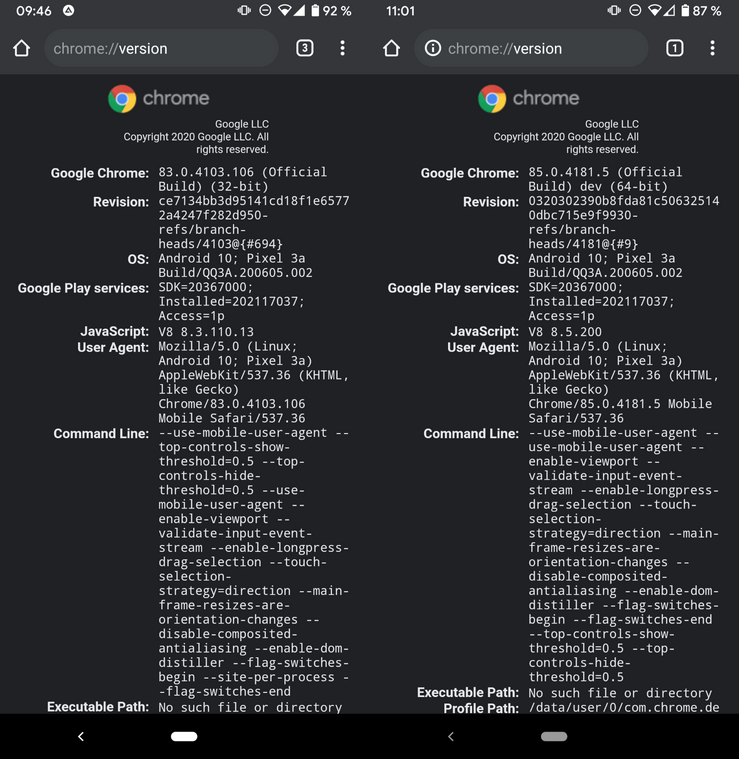
Good news is that the process of finding out is relatively easy. All you need to do is load chrome://version in the mobile browser’s address bar to get information about the architecture and related information. Check the first line of the output on the page to find out whether the installed version of Chrome is 32-bit or 64-bit. The browser has been upgraded to the 64-bit version already if you see 64-bit listed in that line; if it still states 32-bit, you are still using a 32-bit version and need to wait for the migration to happen on the device.
The following screenshot shows a 32-bit version of Google Chrome Stable, currently at version 83, and a 64-bit version of Google Chrome Dev, currently at version 85, running on the same device.
Google Play, the official store for Android applications on most devices, does not provide options to download 32-bit or 64-bit versions of applications. There is no official option to migrate manually to the 64-bit version of Chrome if the 32-bit version is still installed or offered. Third-party sites that provide downloads for Android APK files may offer 64-bit versions of Google Chrome that users with Android 10 or newer versions of the operating system may install. While that may make sense in some cases, it is safer to wait for the official rollout of the feature.
[mai mult...]It is sometimes difficult to download certain elements from websites. Some sites use code that actively prevents the use of save options of the browser that is being used; many use Javascript for that, others try to force you to sign-up for an account before some functionality becomes available. The new Firefox add-on behind! has been designed as a workaround. It allows you to display and then download any image that is behind the cursor, even on sites that try to prevent this from happening.
All you need to do is install the extension in the browser, right-click on the image that you want to display fully or download, and select the behind! option of the right-click context menu. The extension opens a new tab and loads the selected image in that tab.

The extension may display multiple versions of the image on the opening page; this is the case if the site uses multiple versions, e.g. a small resolution one that it displays on the page and a larger one that it links to. You can look at the images and use built-in functionality to zoom the content or to save it. To save one of the images, right-click on the image and select the “save image as” option of the context menu to do so.

The developer of the extension lists a number of cases where the extension may help users. It can reveal:
The extension has no options at the time of writing. It worked really well on all tested websites but a set of options would certainly make it more useful or flexible. An option to select the target action when selecting the behind! option comes into mind, e.g. to open the image in a foreground tab instead of a background tab, or to download all images or the smallest/largest right away.
Other than that, it is a great extension for Firefox users who sometimes or often encounter sites that somehow block them from displaying or downloading images.
[mai mult...]Openpyxl is a Python library for reading and writing Excel (with extension xlsx/xlsm/xltx/xltm) files. The openpyxl module allows Python program to read and modify Excel files.
For example, user might have to go through thousands of rows and pick out few handful information to make small changes based on some criteria. Using Openpyxl module, these tasks can be done very efficiently and easily.
[mai mult...]Dupa ce ai ascuns paginile cu aplicatii, vei primi o alerta ce te atentioneaza ca download-urile noi vor aparea in sectiunea Recently Added din Appl Library. Pentru moment, este setat ca implicit sa apara in homescreen download-urile, dar se poate schimba acest lucru in Setari.
[mai mult...]Openpyxl is a Python library for reading and writing Excel (with extension xlsx/xlsm/xltx/xltm) files. The openpyxl module allows Python program to read and modify Excel files.
For example, user might have to go through thousands of rows and pick out few handful information to make small changes based on some criteria. Using Openpyxl module, these tasks can be done very efficiently and easily.
Use this command to install openpyxl module :
sudo pip3 install openpyxl[mai mult...]