
Soluții

Keyboard Shortcuts for YouTube

Google’s video website wouldn’t be complete without all sorts of useful buttons and hidden commands that aren’t immediately obvious. Use this hotkey cheat sheet to quickly navigate YouTube and gain better control over your video browsing experience.

YouTube’s built-in keyboard shortcuts work for any operating system, including Windows, Mac, Linux, and Chrome OS. Unfortunately, they aren’t customizable.

[mai mult...]
How to Forget a Wi-Fi Network on Mac

Your Mac automatically remembers W-Fi networks you’ve connected to in the past. However, the network it automatically connects to might not be the best option. Here’s what to do if you want your Mac to forget a Wi-Fi network.

In addition to removing old connections, forgetting a Wi-Fi network can help you troubleshoot connection issues. If a network has changed its password and your Mac doesn’t give you a password prompt (or if it’s just being flaky), you can try forgetting and rejoining the network.

To do so, click the Wi-Fi icon in your Mac’s menu bar, and then select “Open Network Preferences.”

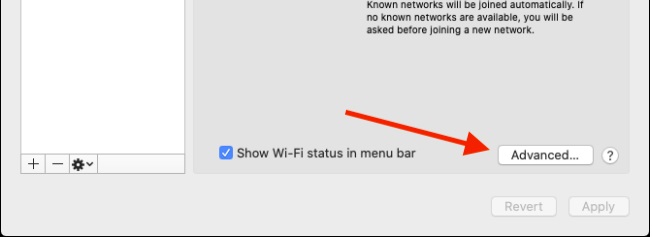
Here, click “Advanced.”

[mai mult...]

Reading an excel file using Python

Using xlrd module, one can retrieve information from a spreadsheet. For example, reading, writing or modifying the data can be done in Python. Also, user might have to go through various sheets and retrieve data based on some criteria or modify some rows and columns and do a lot of work.

[mai mult...]

Cum să adăugați excluderi în Windows Defender pe Windows 10

Windows 10 Logo

Windows Defender, integrat în Windows 10, rulează în fundal și scanează fișierele dvs. pentru a găsi malware. Pentru a îmbunătăți performanțele pentru sarcini precum compilarea codului sau rularea mașinilor virtuale, puteți adăuga o excludere și Windows Defender nu va scana niciodată aceste fișiere. Excluderile vă pot ajuta, de asemenea, dacă vă confruntați cu poziții false în care Windows Defender marchează fișierele legitime drept malware.

Avertisment: fiți atenți la ceea ce excludeți. Windows Defender nu vă va scana fișierele și directoarele excluse în privința programelor malware. Nu ați dori să excludeți totul din folderul Descărcări, de exemplu!

[mai mult...]