Cum porniți în modul sigur (safe mode) un Samsung Galaxy S10
Aceasta metodă de pornire în modul sigur este valabila dacă telefonul este deja pornit.
[mai mult...]
Soluții pentru problemele tale IT

Aceasta metodă de pornire în modul sigur este valabila dacă telefonul este deja pornit.
[mai mult...]Uneori, o aplicație de pe noul dvs. telefon Samsung Galaxy S10 nu funcționează corect. Un motiv posibil este colectarea cache-ului aplicației. Dacă este cazul, va trebui să ștergeți memoria cache a aplicației.
[mai mult...]What do we need to do to keep the data valid in Excel? Sometimes you need to restrict the input value and give some tips for further steps.
[mai mult...]Like you can do when looking up words in a dictionary, the built-in iPhone thesaurus is usable with apps and through mobile web. You can use the thesaurus with writing apps like Pages and Bear, for example, or with mobile Safari or Chrome.
[mai mult...]Emoji are playful graphical representations of emotions, things, symbols, or ideas. Sometimes while using Windows 10, you’d like to quickly find the perfect emoji, but there are hundreds to choose from. Here’s how to quickly find the emoji you’re looking for with a text search.
First, open the app you’d like to insert the emoji into. Focus on a text input area in any Windows application by clicking on it, and when you see a cursor, press either the Windows+. or Windows+; key combination (i.e., the Windows key and a period or the Windows key and a semicolon).The emoji picker panel will pop up.

With the emoji panel open, begin typing a word that corresponds with what emoji you’d like to find. For example, you could type “Cat” if you’re looking for a cat emoji, or “Cry” if you want to find a crying emoji.
If your search is more on the general side (such as “Fruit”), the results will match all applicable emoji, not just a single one, so you can pick the exact one you’d like to use the most.

If you switch away from the search results by clicking on another category symbol at the bottom, click on the magnifying glass to see them again.

Now you’re ready to express your thoughts perfectly—with no words required! The emoji picker and its Search feature work in basically any Windows desktop application, from Notepad to Google Chrome.
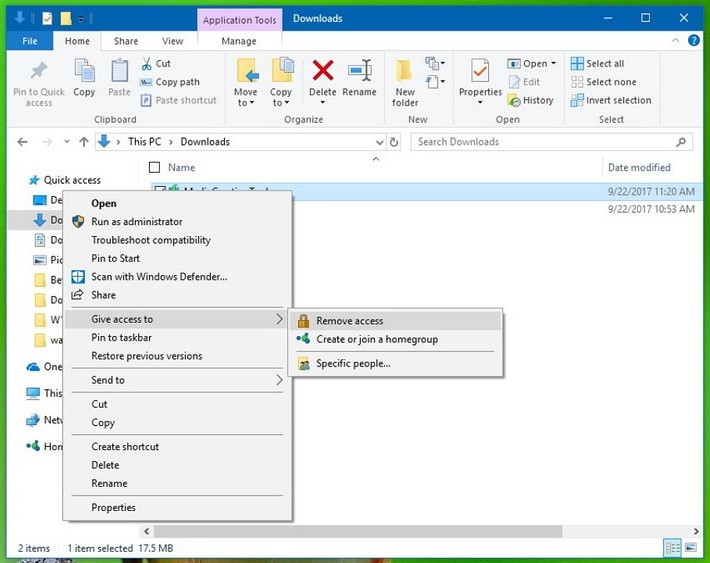
[mai mult...]Folosind aceasta functie (Give access to), puteti accesa cu usurinta o serie de optiuni pentru a seta permisiunile de retea, opri partajarea elementelor si chiar crea sau alatura un grup. Cu toate acestea, daca nu utilizati niciodata aceasta caracteristica si simtiti ca meniul se incarca prea mult, puteti utiliza “Registry” pentru a elimina functia data.