Soluții

Cum folosesti noile “Shortcut App Icons” pe Oxygen OS 16

Noul update OxygenOS 16 vine cu posibilitatea de a face o actiune simpla (cum ar fi sa pornesti o inregistrare video sau sa deschizi un tab Incognito), fara sa dai 3-4 click-uri, ci cu un singur click.

Acest lucru este posibil prin noua functionalitate de adaugare a shortcut-urilor catre anumite actiuni ale unei aplicatii direct pe iconita de pe Home Screen. Asadar, iata ce trebuie sa faci pentru a profita de functionalitate. Voi face o demonstratie pentru aplicatia “Camera”.

[mai mult...]

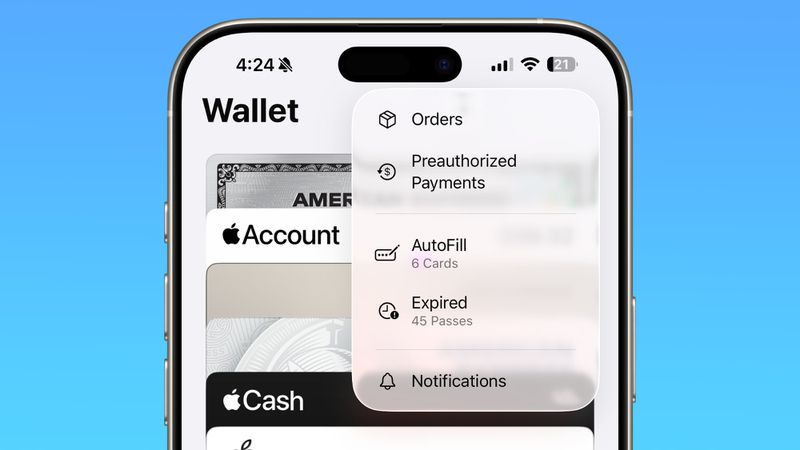
iOS 26: Track Emailed Orders in Apple Wallet

In iOS 26, Apple Intelligence makes the Wallet app’s order tracking feature genuinely useful by scanning your email for shipping details.

The ability to track orders in Apple Wallet isn’t new – it’s actually been around since iOS 16. But if you’ve never noticed it before, don’t worry. Most people haven’t used it either.

The feature initially struggled because it relied on merchants to actively support it, but not many bothered. In fact, despite being available for years, order tracking in Apple’s Wallet app remained largely unused. But there’s a decent chance iOS 26 will change all that.

Order Tracking Meets Apple Intelligence
In iOS 26, Apple Intelligence now scans your emails to automatically extract order tracking information. This means virtually any online purchase that generates a confirmation email can now appear in the Wallet app.

The on-device AI identifies shipping details from emails sent by merchants or delivery carriers, then consolidates everything in the Wallet app’s Order Tracking page.

Just note that you’ll need an iPhone 15 Pro, iPhone 16, iPhone 17, or iPhone Air to access the improved order tracking, since Apple Intelligence isn’t available on older devices.

Enabling Order Tracking in Settings
You can enable the AI-enhanced order tracking feature in the following way:

[mai mult...]

iOS 26: Screen and Filter Messages from Unknown Senders

In iOS 26, Apple has introduced enhanced message filtering that gives you more control over unwanted texts, separating spam messages from unknown senders into distinct categories. Here’s how to set up and use these new filtering options to keep your Messages app clutter-free.

Enable Message Filtering Settings
Before you can filter messages from unknown senders in iOS 26, you need to enable the filtering options in your Messages settings.

[mai mult...]

The process was terminated due to an internal error in the .NET Runtime

This error indicates a critical failure within the .NET Runtime, often resulting in the abrupt termination of an application. It typically stems from runtime corruption, system conflicts, or internal exceptions. In this post, we are going to see what you can do if a process was terminated due to an internal error in the .NET Runtime, Exit code 80131506, Event ID 1023.

Description: The process was terminated due to an internal error in the .NET Runtime at IP with exit code 80131506.

Event ID: 1023

.NET crashes often happen due to version conflicts between SDK and runtime components or corrupted dependencies. To troubleshoot, first check your versions by running `dotnet –info` and ensure they are consistent. Additionally, consider reinstalling the Visual C++ redistributables, as .NET depends on these native components. Aligning these elements usually resolves the frequent crashes.

Fix The process was terminated due to an internal error in the .NET Runtime

Exit code 0x80131506 happens when the .NET Runtime runs into serious internal problems. These problems can occur due to issues with managing memory, corrupted just-in-time (JIT) compilation, or problems loading assemblies. Incompatible native libraries, heap corruption, or damage to a runtime component may trigger it. When this occurs, the normal execution stops, and the process must end immediately.

If the Event Viewer log says The process was terminated due to an internal error in the .NET Runtime at IP with exit code 80131506, follow the solutions mentioned below.

  1. Clear .NET Native image cache and temporary files
  2. Repair .NET Runtime Installation
  3. Check Memory Environment Variable
  4. Update or reinstall C++ Redistributables
[mai mult...]